renv::restore()Tropical light exposure & health
Johannes Zauner 
Preface
Personal light exposure (PLE) varies strongly between geographic locations, photoperiod, climate, the built environment, culture, and especially dependent on human behaviour. This is important, as PLE is increasingly indicated in not just acute effects, like alertness, mood, and wellbeing, but also longterm mental, metabolic, and cardiovascular health. To support longterm health, recommendations for healthy daytime, evening, and nighttime light have been developed, based on laboratory studies on the so-called non-visual effects of light throughout this century1.
Wearable light loogers are used to assess personal light exposure under naturalistic conditions. However, our understanding of PLE is dominated from western, industrialized, high-income countries, and especially limited to how PLE varies in different climates. The MeLiDos project captured annotated, high-resolution and multi-country datasets with a harmonized protocol in Sweden, the Netherlands, Germany, Spain, Turkey, Costa Rica, and Ghana (Figure 1).
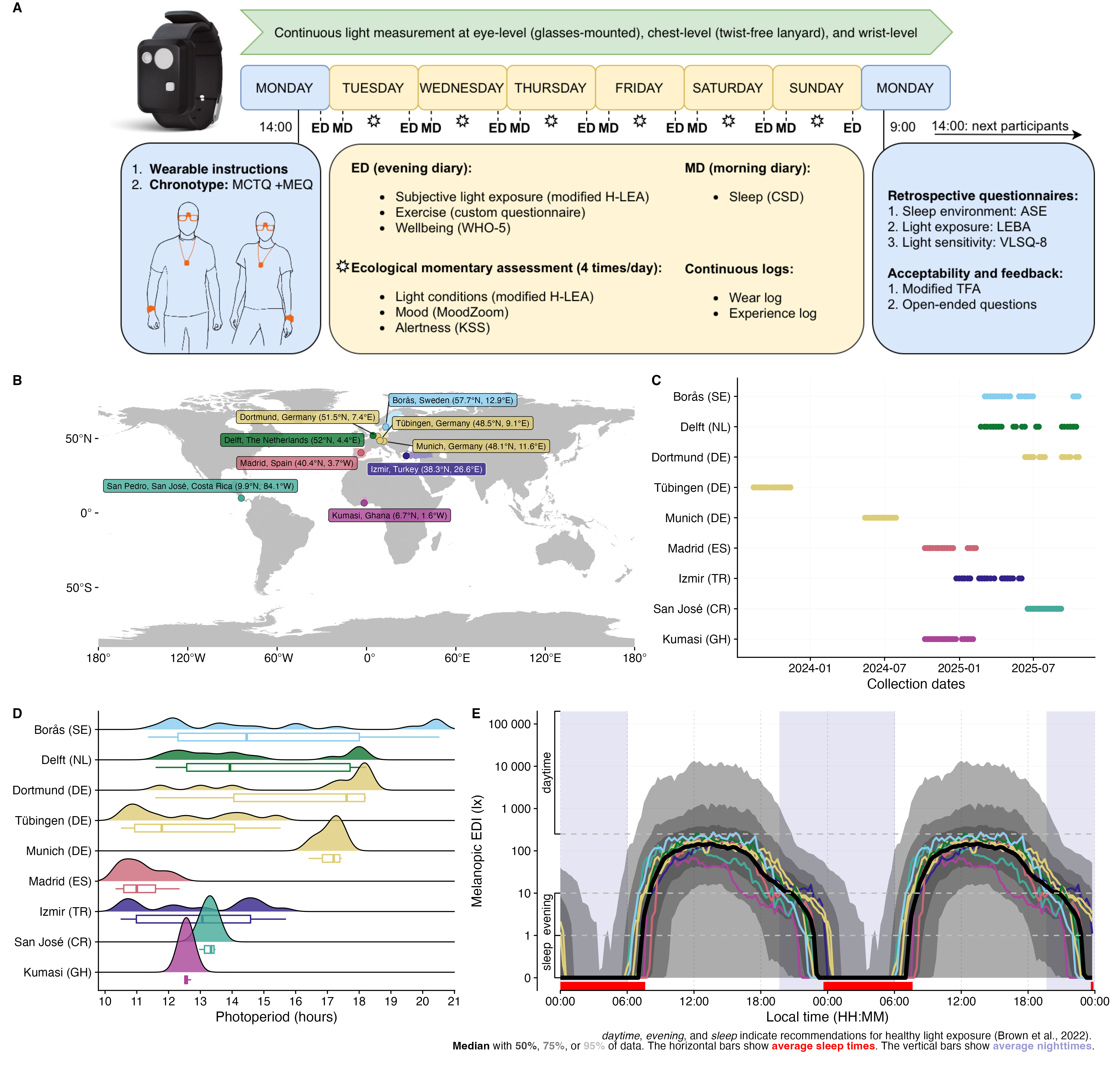
This document uses the melidosData R package to load and analyze MeLiDos study data for the Costa Rica site. The document has the following goals:
- load chest-level wearable data for
Costa Rica - create plots to gain an understanding of exposure patterns
- calculate common exposure metrics
- load sleep-wake data for the same dataset
- merge sleep-wake data with PLE data
- calculate, summarize, and visualize adherence to recommendations for PLE
The analysis uses standardized processing pipelines through the LightLogR package. LightLogR is designed to facilitate the principled import, processing, and visualization of such wearable‑derived data. An accessible entry point to LightLogR via a self‑contained analysis script is shown here. Full documentation of LightLogR’s features is available on the documentation page, including numerous tutorials.
This document assumes general familiarity with the R statistical software, ideally in a data‑science context2.
How this page works
This document contains the script for the online course series as a Quarto script, which can be executed on a local installation of R. Please ensure that all libraries are installed prior to running the script.
If you want to dive into the analysis without installing R or the packages, try the script version running webR, for an interactive but slightly reduced version.
To run this script, we recommend cloning or downloading the GitHub repository (link to Zip-file) and running tropical_light_exposure_health.qmd. Alternatively, you can download the main script separately - though this is more laborious and error‑prone. In both cases, you’ll need to install the required packages. A quick way is to run:
Installation
melidosData is hosted on CRAN, which means it can easily be installed from any R console through the following command:
install.packages("melidosData")After installation, it becomes available for the current session by loading the package. We also require a number of packages. Most are automatically downloaded with LightLogR, but need to be loaded separately. Some might have to be installed separately on your local machine.
library(melidosData) #load the package
library(LightLogR) #load the package
library(tidyverse) #a package for tidy data science
library(gt) #a package for great tables
#the following packages are needed for preview functions:

# Set a global theme for the background
theme_set(
    theme(
      panel.background = element_rect(fill = "white", color = NA)
    )
)
We start by making a decision on the site we want to look at and collect some metadata about it.
site <- "UCR"
melidos_coordinates[[site]]
[1] 9.9372 -84.0509melidos_colors[[site]][1] "#44AA99"melidos_cities[[site]][1] "San Pedro, San José"melidos_countries[[site]][1] "Costa Rica"melidos_tzs[[site]][1] "America/Costa_Rica"Want to use a different site? Just switch the Institution name in the code cell above
| Institution (site Abbr.) | City | Country | Repository | DOI |
|---|---|---|---|---|
KNUST |
Kumasi | Ghana | AkuffoEtAl_Dataset_2025 | 10.5281/zenodo.15576731 |
UCR |
San José | Costa Rica | Sancho-SalasEtAl_Dataset_2025 | 10.5281/zenodo.17289456 |
IZTECH |
Izmir | Turkey | DidikogluEtAl_Dataset_2025 | 10.5281/zenodo.16568109 |
FUSPCEU |
Madrid | Spain | BaezaEtAl_Dataset_2025 | 10.5281/zenodo.16834951 |
TUM |
Munich | Germany | HildenEtAl_Dataset_2025 | 10.5281/zenodo.16893901 |
MPI |
Tübingen | Germany | GuidolinEtAl_Dataset_2025 | 10.5281/zenodo.16895188 |
BAUA |
Dortmund | Germany | BroszioEtAl_Dataset_2025 | 10.5281/zenodo.18111232 |
THUAS |
Delft | The Netherlands | AertsEtAl_Dataset_2025 | 10.5281/zenodo.17979893 |
RISE |
Borås | Sweden | NilssonTengelinEtAl_Dataset_2026 | 10.5281/zenodo.18925834 |
Load and visualize light exposure data for Costa Rica
The load_data() function loads pre-processed data from the MeLiDos project. The site argument can be set to one or multiple sites. In our case, UCR loads the right data. Check above to see details about the site. To reduce data complexity, we use 1-minute aggregated data, which has also been pre-processed and cleaned.
 [1] "Id"          "Datetime"    "EVENT"       "TEMPERATURE" "ORIENTATION"
 [6] "PIM"         "PIMn"        "TAT"         "TATn"        "ZCM"
[11] "ZCMn"        "LIGHT"       "IR.LIGHT"    "CAP_SENS_1"  "CAP_SENS_2"
[16] "F1"          "F2"          "F3"          "F4"          "F5"
[21] "F6"          "F7"          "F8"          "MEDI"        "CLEAR"
[26] "STATE"       "file.name"   "position"    "is.implicit"
We can explore this dataset in several, low-effort ways.
data |>
  gg_overview() + #create the overview plot
  theme_sub_axis_y(text = element_blank()) #remove y-axis text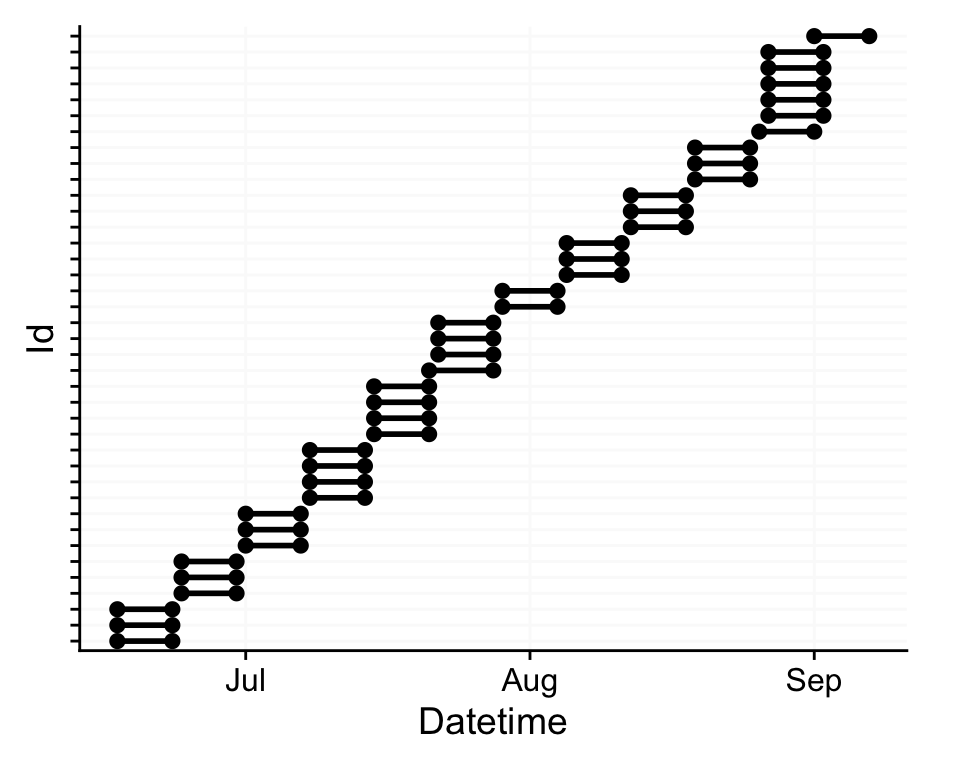
data |>
  summary_overview() |> #calculate overview stats
  gt() |> sub_missing() |>  #show as table
  tab_header(
    paste0("Dataset overview for ",
           melidos_cities[[site]], ", ",
           melidos_countries[[site]])
)| Dataset overview for San Pedro, San José, Costa Rica | |||
| name | mean | min | max |
|---|---|---|---|
| Participants | 39 | — | — |
| Participant-days | 235 | 6 | 7 |
| Days ≥80% complete | 235 | 6 | 7 |
| Missing/Irregular | 0 | 0 | 0 |
data |>
  sample_groups(5) |> #select 5 groups (participants)
  aggregate_Datetime("15 mins", type = "floor") |> #condense data to 15-minute intervals
  gg_days() |>  #create timeline plot
  gg_photoperiod(melidos_coordinates[[site]]) #add photoperiod information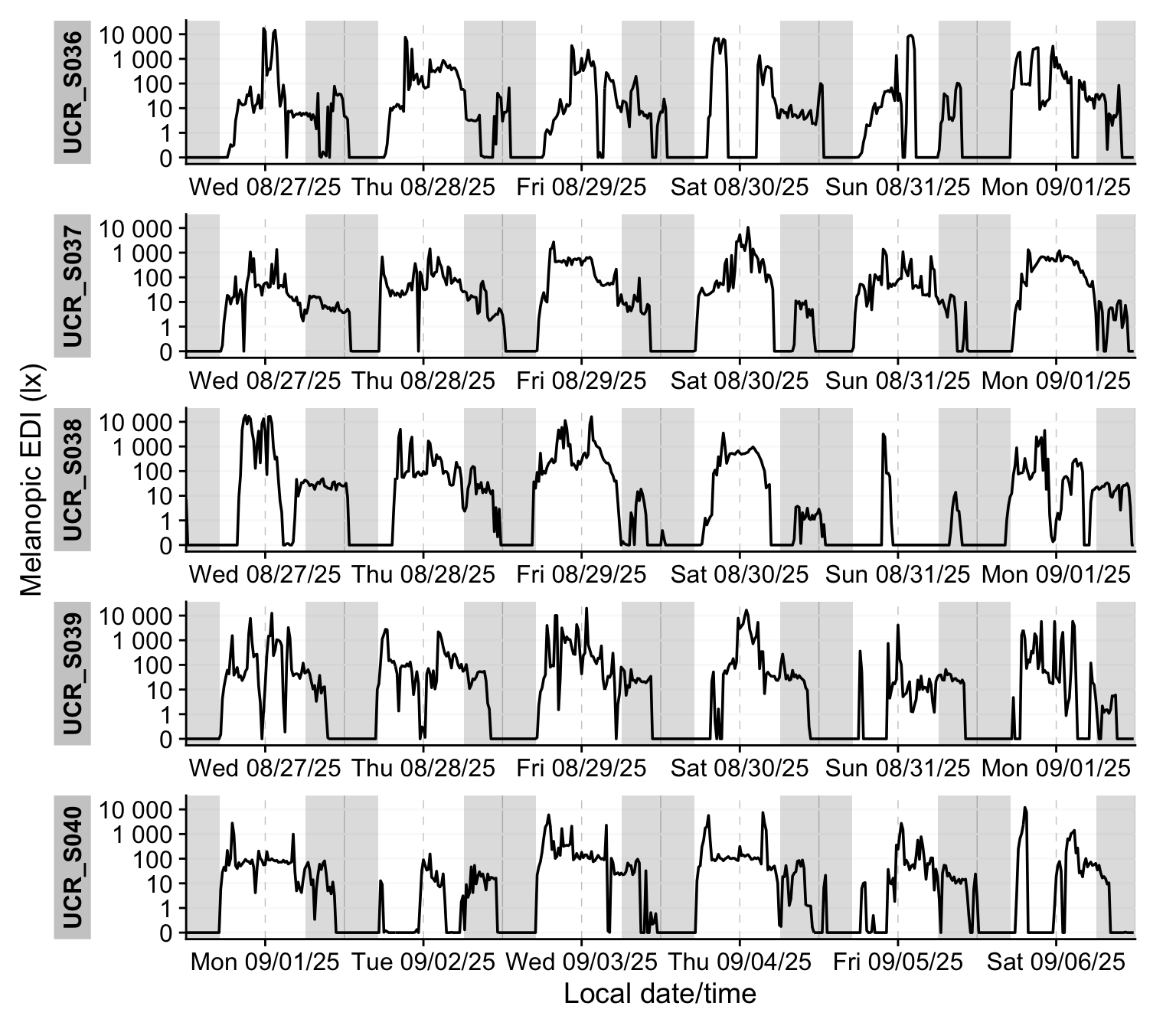
data |>
  ungroup() |> #remove by-participant grouping
  aggregate_Date(unit = "15 mins") |> #condense data to 1 day of 15-minute intervals
  gg_doubleplot(fill = melidos_colors[[site]]) |> #create double plot
  gg_photoperiod(melidos_coordinates[[site]]) #add photoperiod information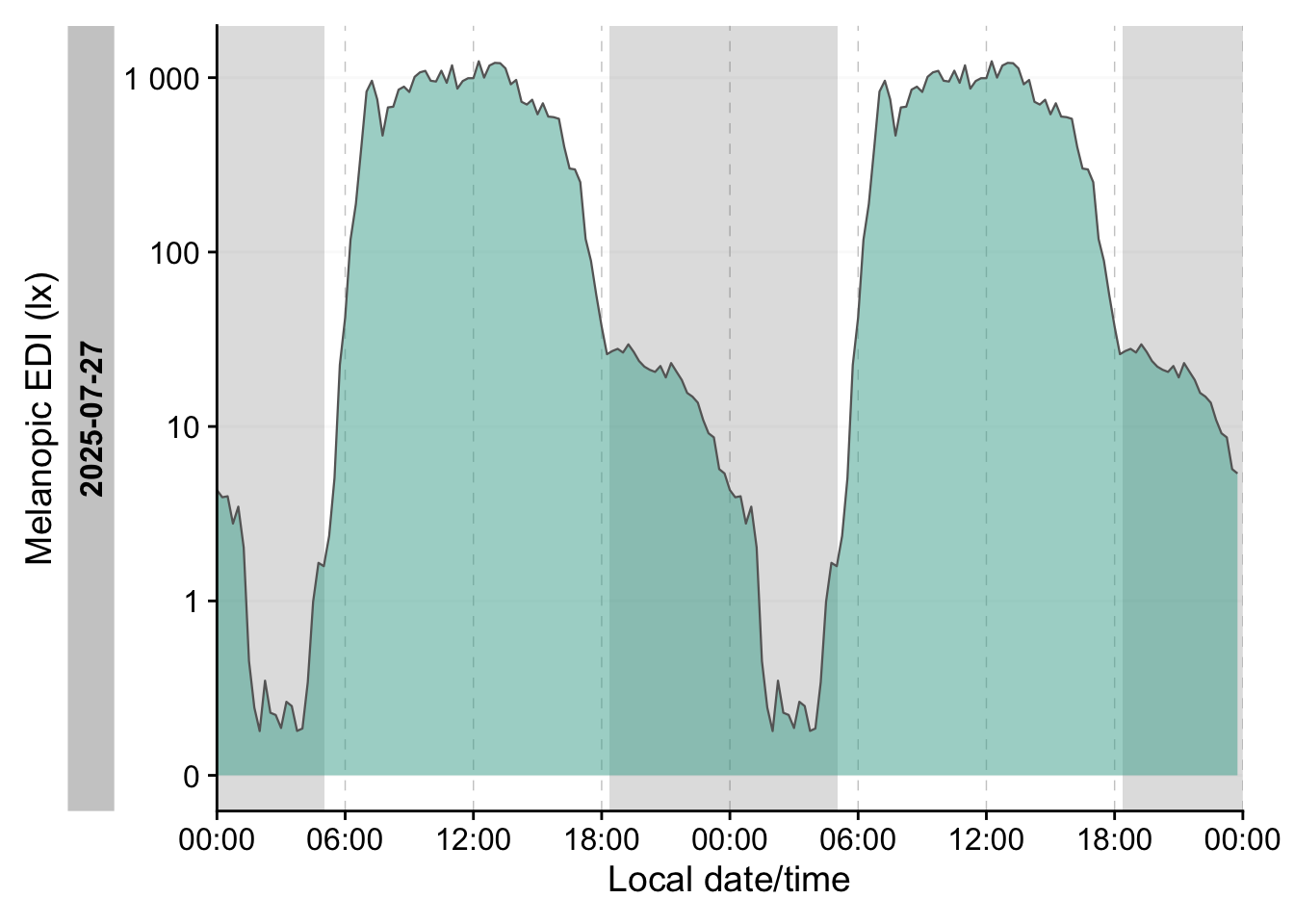
Calculate common exposure metrics
LightLogR has a summary function that calculates many common metrics and shows how they are distributed within the dataset.
data |>
  summary_table( #summary table function
    melidos_coordinates[[site]], #provide coordinates for photoperiod calculation
    location = melidos_cities[[site]], #provide a label for location
    site = melidos_countries[[site]], #provide a label for site
    color = melidos_colors[[site]] #provide a color for histogram generation
)| Summary table | ||||
| San Pedro, San José, Costa Rica, 9.9°N, 84.1°W, TZ: America/Costa_Rica | ||||
| Overview | ||||
|---|---|---|---|---|
| Participants | Participants | 39 | ||
| Participant-days | Participant-days | 235 (6 - 7) | ||
| Days ≥80% complete | Days ≥80% complete | 235 (6 - 7) | ||
| Missing/irregular | Missing/Irregular | 0.0% (0.0% - 0.0%) | ||
| Photoperiod | Photoperiod | 13h 17m (12h 57m - 13h 28m) | 1 | |
| Metrics2 | ||||
| Dose | D (lx·h) | 9,205 ±9,674 (189 - 71,715) | ||
| Duration above 250 lx | TAT250 | 3h 4m ±2h 14m (0s - 9h 19m) | ||
| Duration within 1-10 lx | TWT1-10 | 2h 53m ±1h 51m (3m - 10h 30m) | ||
| Duration below 1 lx | TBT1 | 9h 44m ±2h 35m (2h - 21h 29m) | ||
| Period above 250 lx | PAT250 | 53m 10s ±46m 46s (0s - 4h 48m) | ||
| Duration above 1000 lx | TAT1000 | 1h 23m ±1h 21m (0s - 6h 37m) | ||
| First timing above 250 lx | FLiT250 | 07:55 ±02:03 (00:04 - 14:36) | 1 | |
| Mean timing above 250 lx | MLiT250 | 12:02 ±01:27 (06:29 - 16:50) | 1 | |
| Last timing above 250 lx | LLiT250 | 16:59 ±02:29 (07:45 - 23:51) | 1 | |
| Brightest 10h midpoint | M10midpoint | 12:57 ±01:49 (06:04 - 18:59) | 1 | |
| Darkest 5h midpoint | L5midpoint | 03:13 ±03:18 (00:07 - 23:55) | 1 | |
| Brightest 10h mean3 | M10mean (lx) | 144.1 ±178.5 (0.1 - 1,274.6) | ||
| Darkest 5h mean3 | L5mean (lx) | 0.0 ±0.1 (0.0 - 1.5) | ||
| Interdaily stability | IS | 0.293 ±0.070 (0.158 - 0.452) | ||
| Intradaily variability | IV | 1.223 ±0.310 (0.495 - 1.894) | ||
| values show: mean ±sd (min - max) and are all based on measurements of melanopic EDI (lx) | ||||
| 1 Histogram limits are set from 00:00 to 24:00 | ||||
| 2 Metrics are calculated on a by-participant-day basis (n=235) with the exception of IV and IS, which are calculated on a by-participant basis (n=39). | ||||
| 3 Values were log 10 transformed prior to averaging, with an offset of 0.1, and backtransformed afterwards | ||||
Load and merge sleep-wake data with light exposure data
We start by loading sleepdiaries data. Because we only want to check for data when devices were worn, we also load the wearlog information.
We can quickly check what information is available in both datasets with the extract_labels() function.
sleepdata |> extract_labels() |> head() Id
"Record ID"
bedtime
"What time did you get into bed?"
sleepprep
"What time did you try to go to sleep?"
wake
"What time was your final awakening? i.,e. when did you wake up today?"
out_ofbed
"What time did you get out of bed for the day?"
sleepdelay
"How long did it take you to fall asleep? Please answer in minutes" wearlog |> extract_labels() |> head() Id start
"Record ID" "Start datetime of the state"
state duration
"Wearlog state" "Duration of the state"
end wearlog_event
"End datetime of the state" "Description of the starting event" In the next step, we prepare the sleepdiary data by selecting a subset containing the participant ID, as well as the time when participants prepared to sleep (sleepprep) and when the woke (wake). Because we are not only interested in labelling sleep periods, but also the in-between wake periods, we pivot the data to a longer form and transform them to intervals. Based on those sleep and wake intervals, we assign states according to Brown et al. (day, evening, night).
sleepdata <-
sleepdata |>
  select(Id, sleep = sleepprep, wake) |> #subset of the sleepdiaries
  group_by(Id) |> #group by participant
  pivot_longer(-Id, names_to = "sleep", values_to = "Datetime") |> #reshape to one row per state
  sc2interval(Statechange.colname = sleep, starting.state = "wake") |> #intervals (with max length) instead of timestamps
  sleep_int2Brown(sleep.state = "sleep", Brown.day = "wake", #Brown et al. intervals
                  Brown.evening = "pre-sleep", Brown.night = "sleep") |> #Brown et al. intervals
  mutate(sleep = case_when(is.na(sleep) & State.Brown == "pre-sleep" ~ "wake", #fill in values for pre-sleep
                                 .default = sleep))
Adding missing grouping variables: `Id`head(sleepdata)# A tibble: 6 × 4
# Groups: Id [1]
Id sleep Interval State.Brown
<chr> <chr> <Interval> <chr>
1 UCR_S001 wake 2025-06-16 00:00:00 CST--2025-06-16 18:30:00 CST wake
2 UCR_S001 wake 2025-06-16 18:30:00 CST--2025-06-16 21:30:00 CST pre-sleep
3 UCR_S001 sleep 2025-06-16 21:30:00 CST--2025-06-17 06:36:00 CST sleep
4 UCR_S001 wake 2025-06-17 06:36:00 CST--2025-06-17 18:30:00 CST wake
5 UCR_S001 wake 2025-06-17 18:30:00 CST--2025-06-17 21:30:00 CST pre-sleep
6 UCR_S001 sleep 2025-06-17 21:30:00 CST--2025-06-18 06:30:00 CST sleep The transformed sleep data, as well as photoperiod information and wear states get added to the light exposure data.
data <-
data |>
  select(Id, Datetime, MEDI) |> #subset of light data
  add_photoperiod(melidos_coordinates[[site]]) |> #add photoperiod information
  add_states(sleepdata, start = Interval, end = Interval) |> #add sleep information
  add_states(wearlog |> select(Id, start, end, wear = state)) #add wear information
names(data)
[1] "Id" "Datetime" "MEDI"
[4] "dawn" "dusk" "photoperiod"
[7] "photoperiod.state" "sleep" "State.Brown"
[10] "wear" Next, we want to remove instances from the Brown states when the device was not worn during the day or evening.
#Remove non-wear data during wake or pre-sleep
data <-
data |>
  mutate(
    State.Brown = replace_when(
      State.Brown,
      wear == "off" & sleep != "sleep" ~ NA
    )
  )
We can visualize this combined dataset by stacking several of the previous functions and adding the state information on top.
data |>
  sample_groups(3) |> #select three participants
  aggregate_Datetime("15 mins", type = "floor") |> #aggregate to 15-minute bins
  mutate(State.Brown = #order factor labels (for coloring)
           factor(State.Brown, levels = c("wake", "pre-sleep", "sleep"))) |>
  gg_days() |> #create base-plot
  gg_photoperiod() |> #add photoperiod information
  gg_states(State.Brown, #add state information
            aes_fill = State.Brown, #fill by state
            ymax = 0, alpha = 1 #only create a small band
            ) +
  labs(fill = "State") # adjust legend label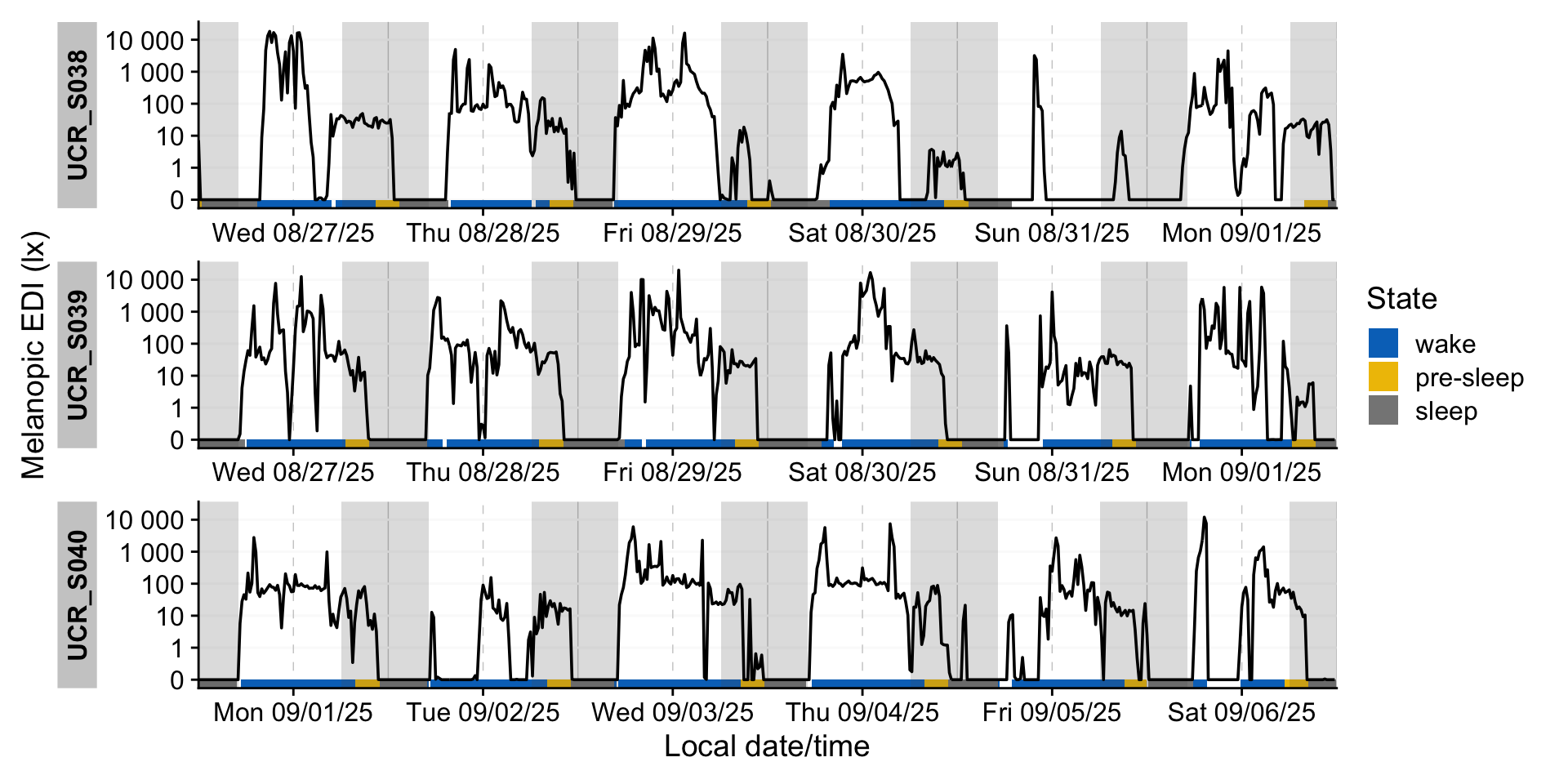
Adherence to Brown et al. recommendations
The first step is to check whether the melanopic EDI were satisfactory at a given moment through the Brown2reference() function.
data <-
data |>
  Brown2reference(Brown.day = "wake", #check whether melEDI are ok
                  Brown.evening = "pre-sleep",
                  Brown.night = "sleep")
names(data)
[1] "Id" "Datetime" "MEDI"
[4] "dawn" "dusk" "photoperiod"
[7] "photoperiod.state" "sleep" "State.Brown"
[10] "wear" "Reference" "Reference.check"
[13] "Reference.difference" "Reference.label" Based on the previous figure, we can add information on whether a given timepoint was adherent to the recommendations.
data |>
  sample_groups(3) |> #sample 3 groups
  aggregate_Datetime("15 mins", type = "floor") |> #15-minute intervals
  mutate(State.Brown = #create a factor and add an Unknown type
           factor(State.Brown |> replace_na("Unknown"),
                  levels = c("wake", "pre-sleep", "sleep", "Unknown")),
         Reference.check = recode_values( #set names for adherence
           Reference.check |> as.character(),
           "TRUE" ~ "Good",
           "FALSE" ~ "Bad",
           default = "Unknown"
         )) |>
  gg_days( #create the base plot
    jco_color = FALSE, #do not use default fill scale
    geom = "ribbon", #use a ribbon geom
    aes_fill = State.Brown, #fill the ribbon by state
    group = consecutive_id(State.Brown) #group those fills by occurances of state
  ) |>
  gg_photoperiod() |> #add photoperiod
  gg_states(Reference.check, #add state information of adherance
            aes_fill = Reference.check, #fill by adherence
            ymax = 0, alpha = 1, #only a small band
            on.top = TRUE, #put band on top
            ) +
  geom_line() + #add a line on top of everything
  labs(fill = "State") + #adjust legend label
  scale_fill_manual(values = c(wake = "skyblue3", `pre-sleep` = "gold",
                               sleep = "grey", Bad = "red", Good = "green3",
                               Unknown = "white")) #manual scale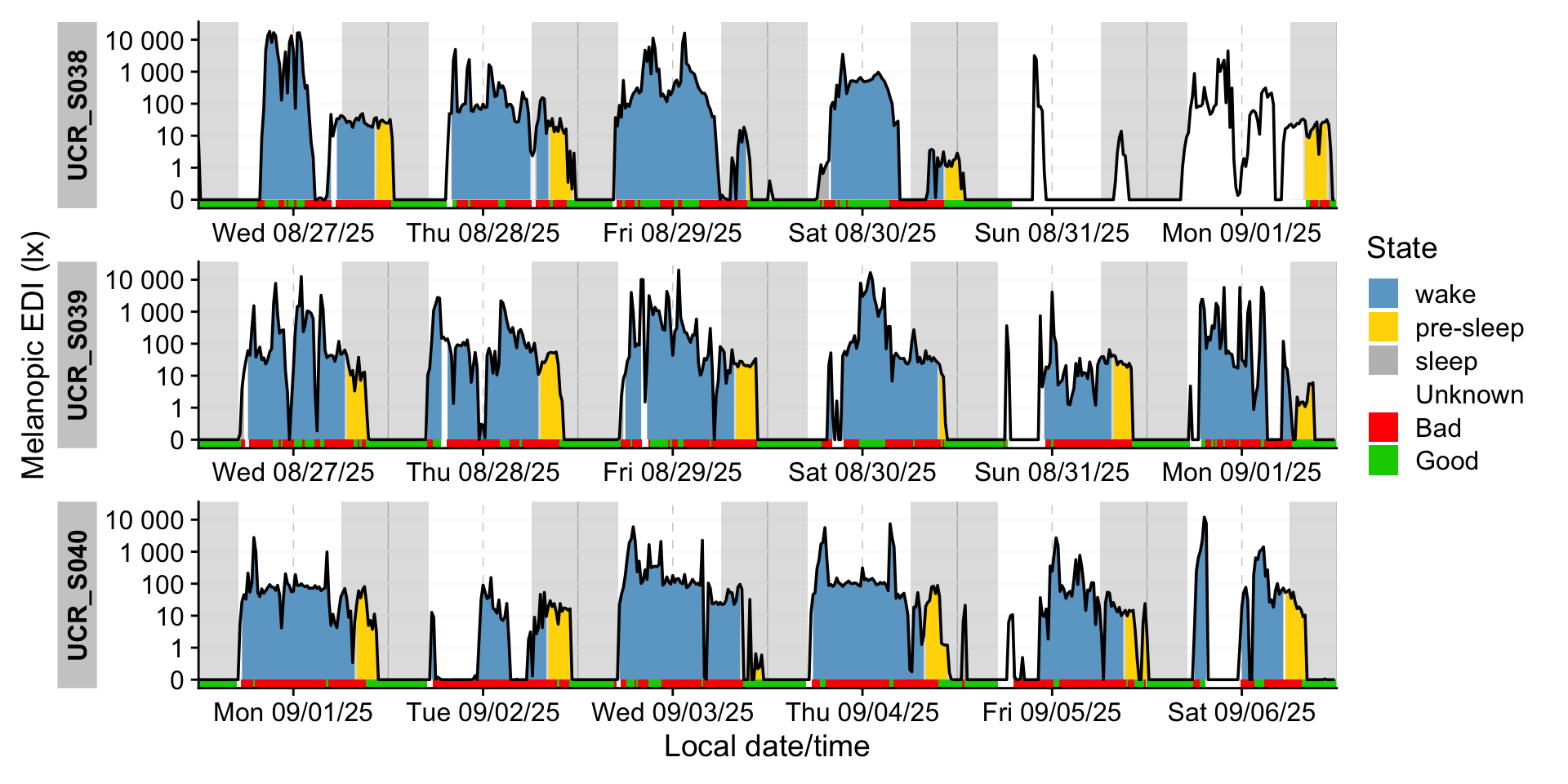
We can also highlight when in the day recommendation is highest and lowest.
data |>
  add_Time_col() |> #add a time column
  drop_na(Reference.check) |> #remove instances where state is unknown
  ggplot(aes(x = Time)) + #create a plot across time
  geom_density(aes(fill = Reference.check), position = "fill") + #with scaled stacked densities
  scale_fill_manual(values = c("red2", "green3")) + #manual scale
  labs(fill = "Within recommendations") #adjust legend label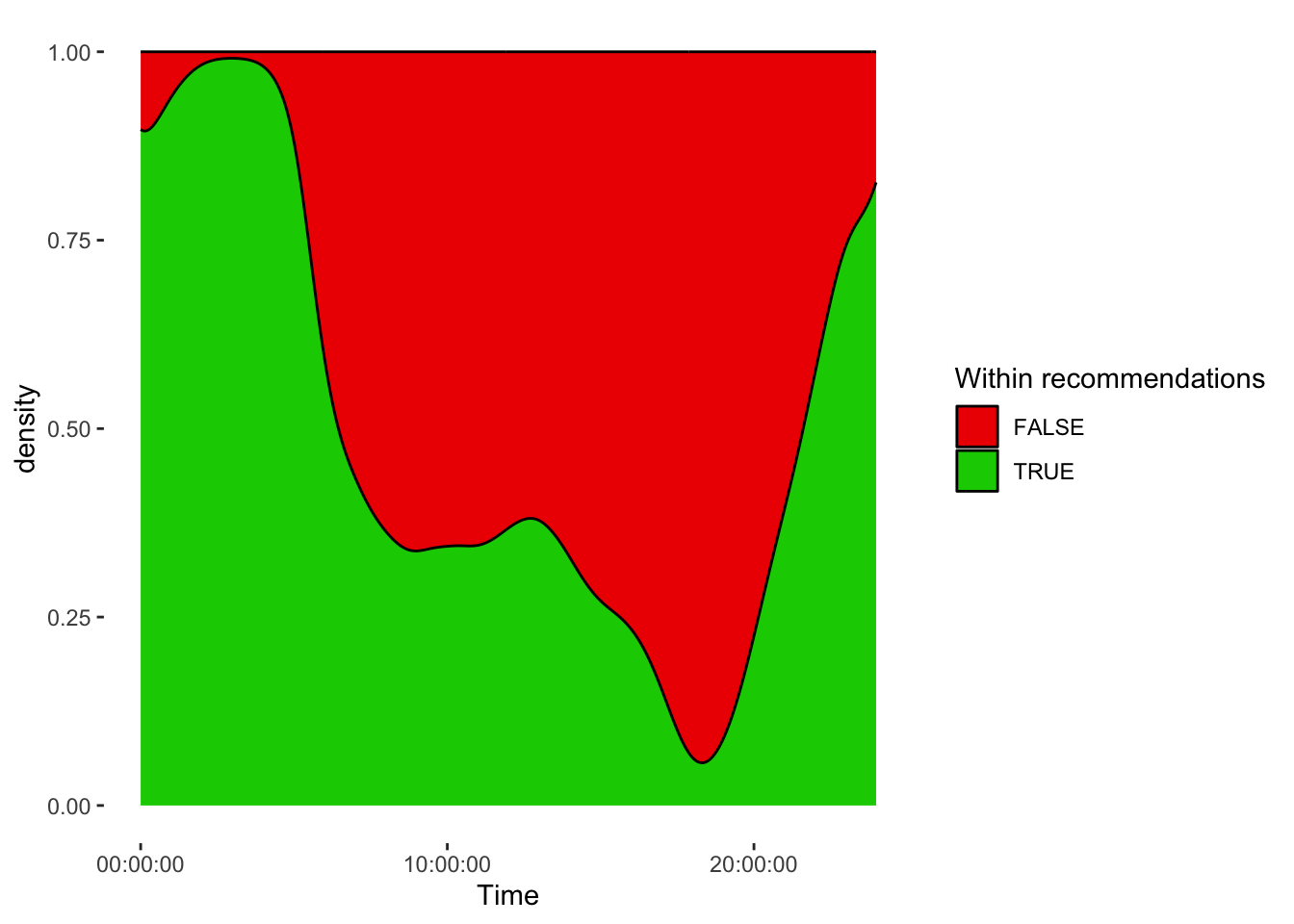
Finally, we calculate exact adherance percentages across states…
adherence_summary <-
data |>
  group_by(State.Brown) |> #group data by Brown state
  durations(Reference.check, #calculate the length for each group
            show.missing = TRUE, #show where data is missing
            FALSE.as.NA = TRUE) |> #regard a FALSE in the data as missing
  ungroup() |> #remove grouping
  mutate(across(duration:missing, \(x) x/total), #calculate percentages
         of.total = (total/sum(total)) |> as.numeric(), #calculate percentages
         duration = replace_values(duration, 0 ~ NA)) |> #set missing
  rename(adherence = duration,
         duration = total) |> #rename
  select(-missing) #remove unneeded column
adherence_summary
# A tibble: 4 × 4
State.Brown adherence duration of.total
<chr> <dbl> <Duration> <dbl>
1 pre-sleep 0.635 2336640s (~3.86 weeks) 0.115
2 sleep 0.918 6129780s (~10.14 weeks) 0.302
3 wake 0.239 10379340s (~17.16 weeks) 0.511
4 <NA> NA 1458240s (~2.41 weeks) 0.0718…and add a summary row
adherence_summary <-
adherence_summary |>
  drop_na() |>
  summarize( #calculate summary row:
    State.Brown = "Overall",
    adherence = (adherence*of.total) |> sum(),
    duration = sum(duration) |> as.duration(),
    of.total = sum(of.total),
    adherence = adherence/of.total
  ) |>
  rbind(adherence_summary) #add the summary row to the detailed table
adherence_summary
# A tibble: 5 × 4
State.Brown adherence duration of.total
<chr> <dbl> <Duration> <dbl>
1 Overall 0.509 18845760s (~31.16 weeks) 0.928
2 pre-sleep 0.635 2336640s (~3.86 weeks) 0.115
3 sleep 0.918 6129780s (~10.14 weeks) 0.302
4 wake 0.239 10379340s (~17.16 weeks) 0.511
5 <NA> NA 1458240s (~2.41 weeks) 0.0718In the final step, we bring this table into a nice layout.
adherence_summary |>
gt() |>
  fmt_percent(c(adherence, of.total), decimals = 1) |> #format as percent
  sub_missing(missing_text = "Unkown") |> #rename missing entries
  cols_label_with(fn = \(x) str_replace(x, "\\.", " ") |> str_to_title()) |> #tranform labels
  tab_style( #show some cells bold
    cell_text(weight = "bold"),
    list(cells_column_labels(), cells_body(1))
  ) |>
  tab_style( #show a highlight for the summary row
    cell_fill("lightgrey"),
    cells_body(rows = 1)
  ) |>
  fmt_duration(duration, input_units = "seconds", output_units = "weeks") |> #format as duration
  tab_header("Adherence to recommendations for healthy lighting", #add a header
             subtitle =
               paste0(melidos_cities[[site]], melidos_countries[[site]], sep = ", ")
)| Adherence to recommendations for healthy lighting | |||
| San Pedro, San JoséCosta Rica, | |||
| State Brown | Adherence | Duration | Of Total |
|---|---|---|---|
| Overall | 50.9% | 31w | 92.8% |
| pre-sleep | 63.5% | 3w | 11.5% |
| sleep | 91.8% | 10w | 30.2% |
| wake | 23.9% | 17w | 51.1% |
| Unkown | Unkown | 2w | 7.2% |
Session info
R version 4.5.0 (2025-04-11)
Platform: aarch64-apple-darwin20
Running under: macOS 26.5

Matrix products: default
BLAS:   /Library/Frameworks/R.framework/Versions/4.5-arm64/Resources/lib/libRblas.0.dylib
LAPACK: /Library/Frameworks/R.framework/Versions/4.5-arm64/Resources/lib/libRlapack.dylib;  LAPACK version 3.12.1

locale:
[1] en_US.UTF-8/en_US.UTF-8/en_US.UTF-8/C/en_US.UTF-8/en_US.UTF-8

time zone: Europe/Berlin
tzcode source: internal

attached base packages:
[1] stats     graphics  grDevices datasets  utils     methods   base

other attached packages:
 [1] gt_1.0.0          lubridate_1.9.4   forcats_1.0.0     stringr_1.5.1
 [5] dplyr_1.2.1       purrr_1.0.4       readr_2.1.5       tidyr_1.3.1
 [9] tibble_3.3.0      ggplot2_4.0.1     tidyverse_2.0.0   LightLogR_0.10.3
[13] melidosData_1.0.6

loaded via a namespace (and not attached):
 [1] gtable_0.3.6       xfun_0.52          htmlwidgets_1.6.4  paletteer_1.6.0
 [5] tzdb_0.5.0         vctrs_0.7.3        tools_4.5.0        generics_0.1.4
 [9] proxy_0.4-27       pkgconfig_2.0.3    KernSmooth_2.23-26 RColorBrewer_1.1-3
[13] S7_0.2.1           lifecycle_1.0.5    compiler_4.5.0     farver_2.1.2
[17] textshaping_1.0.1  suntools_1.0.1     ggsci_3.2.0        fontawesome_0.5.3
[21] litedown_0.7       htmltools_0.5.8.1  class_7.3-23       sass_0.4.10
[25] yaml_2.3.10        pillar_1.10.2      gtExtras_0.6.0     classInt_0.4-11
[29] commonmark_1.9.5   tidyselect_1.2.1   digest_0.6.37      stringi_1.8.7
[33] sf_1.0-21          rematch2_2.1.2     labeling_0.4.3     cowplot_1.1.3
[37] fastmap_1.2.0      grid_4.5.0         cli_3.6.5          magrittr_2.0.3
[41] base64enc_0.1-3    utf8_1.2.6         e1071_1.7-16       withr_3.0.2
[45] scales_1.4.0       warp_0.2.1         timechange_0.3.0   rmarkdown_2.29
[49] slider_0.3.2       ggtext_0.1.2       ragg_1.4.0         hms_1.1.3
[53] evaluate_1.0.4     knitr_1.50         markdown_2.0       rlang_1.2.0
[57] gridtext_0.1.5     Rcpp_1.1.0         glue_1.8.0         DBI_1.2.3
[61] xml2_1.3.8         renv_1.1.4         svglite_2.2.1      rstudioapi_0.17.1
[65] jsonlite_2.0.0     R6_2.6.1           systemfonts_1.3.1  units_0.8-7
Footnotes
If you are new to the R language or want a great introduction to R for data science, we can recommend the free online book R for Data Science (second edition) by Hadley Wickham, Mine Cetinkaya-Rundel, and Garrett Grolemund.↩︎