LightLogR Webinar
  • Home
  • Course flyer
  • Register
  • Recordings
  • Slides
  • Beginner
    • Beginner (live)
    • Beginner (static)
  • Advanced
    • A Day in Daylight
    • live
    • static

    • Case of high light sensitivity
    • live
    • static

    • Therapy lamps
    • live
    • static

    • Visual experience: beyond light
    • live
    • static

  • About / Funding
  • License

On this page

  • 1 Preface
  • 2 How this page works
  • 3 Setup
  • 4 Import
    • 4.1 Light
    • 4.2 State data
  • 5 Merging sleep data
  • 6 Brown et al. (2022) recommendations
  • 7 Calculate metrics
    • 7.1 Sleep-wake cycles
    • 7.2 Light exposure metrics
  • 8 Correlations
  • 9 Conclusion
  • Edit this page
  • Report an issue

Use case #02: Case, light sensitivity

Open and reproducible analysis of light exposure and visual experience data (Advanced)

Author
Affiliation

Johannes Zauner

Technical University of Munich & Max Planck Institute for Biological Cybernetics, Germany

Last modified:

December 8, 2025

1 Preface

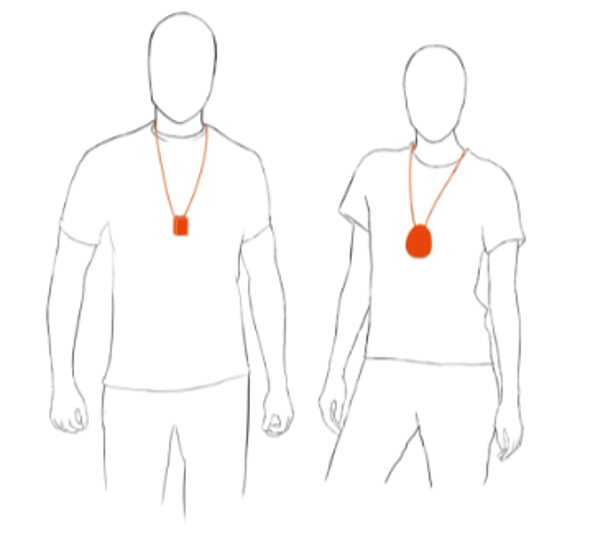
A single patient reports worse sleep after bright days. Consequently, personal light exposure and activity was captured with wearable devices for several weeks. Additionally, morning and evening questionnaires were used to capture sleep, performance, and well-being self evaluations. In this tutorial, we focus on the ActLumus device worn on the chest and the self evaluations.
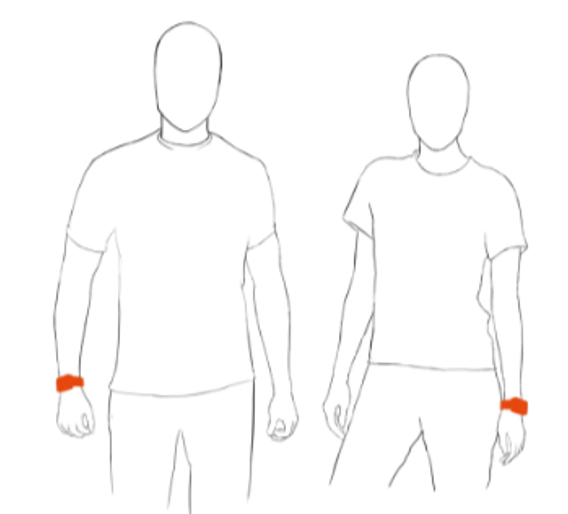
Wearing position ActTrust2 (actigraphy)

Wearing position ActLumus (light exposure)
Figure 1

The tutorial focuses on

  • import and merging of diary data with light data

  • calculation of metrics based on sleep-wake cycles instead of calendar days

  • relating exposure metrics to self assessments of consecutive sleep, performance, and wellbeing

  • assessing compliance to Brown et al. (2022)1 recommendations

2 How this page works

This document runs a self‑contained version of R completely in your browser2. No setup or installation is required.

As soon as as webR has finished loading in the background, the Run Code button on code cells will become available. You can change the code and execute it either by clicking Run Code or by hitting CTRL+Enter (Windows) or CMD+Enter (MacOS). Some code lines have commments below. These indicate code-cell line numbers

NoteIf this is your first course tutorial

This tutorial is considered as advanced. Basic functions in the LightLogR package as well as general tidy workflows are used without dedicated explanation. We recommend working through the beginner example if you are new to LightLogR (note that there is also a static variant).

You can execute the same script in a traditional R environment, but this browser‑based approach has several advantages:

  • You can get started in seconds, avoiding configuration differences across machines and getting to the interesting part quickly.
  • Unlike a static tutorial, you can modify code to test the effects of different arguments and functions and receive immediate feedback.
  • Because everything runs locally in your browser, there are no additional server‑side security risks and minimal network‑related slowdowns.

This approach also comes with a few drawbacks:

  • R and all required packages are loaded every time you load the page. If you close the page or navigate elsewhere in the same tab, webR must be re‑initialized and your session state is lost.
  • Certain functions do not behave as they would in a traditional runtime. For example, saving plot images directly to your local machine (e.g., with ggsave()) is not supported. If you need these capabilities, run the static version of the script on your local R installation. In most cases, however, you can interact with the code as you would locally. Known cases where webR does not produce the desired output are marked specifically in this script and static images of outputs are displayed.
  • After running a command for more than 30 seconds, each code cell will go into a time out. If that happens on your browser, try reducing the complexity of commands or choose the local installation.
  • Depending on your browser and system settings, functionality or output may differ. Common differences include default fonts and occasional plot background colors. If you encounter an issue, please describe it in detail—along with your system information (hardware, OS, browser)—in the issues section of the GitHub repository. This helps us to improve your experience moving forward.

3 Setup

We start by loading the necessary packages.

4 Import

We require both light and log data to be loaded into R before we are able to merge them.

4.1 Light

Light data were captured with ActLumus devices. The exported data files sit in data/case_light_sensitivity/.

  1. As there is only one participant, we set a manual Id

This dataset spans about three weeks. We know that the diaries only start on 24 September 2025 - thus we remove prior data. We also test for irregular data or gaps in this trimmed dataset.

  1. If we have a hard-set beginning or end time, filter_Date() or filter_Datetime() provide convenient cut-off functionality.

  2. As we are dealing with a single participant, we don’t require grouping by Id.

We can continue, seeing as there are no issues with the regular time series. We start by plotting the full series

  1. Reduce the interval by averaging over 15 minute periods

  2. Easily change the label format. Look at the help page of ?strptime for the available syntax.

We can see the light intensity varies greatly. Let’s look at the extremes.

  1. Adding, and grouping by, the date gives us 20 groups, each covering one calender day

4-7. Select the three groups with the highest duration above 250 lx mel EDI

Looking at the first half of 02 October 2025, we can already see that this likely a period of non-wear, or sleep - this, we have to come back to later.

  1. Select the three groups with the lowest duration above 250 lx mel EDI

4.2 State data

We need information about sleep times. These can be found in the diaries.

The morning diary is all about last nights sleep, how long the needed to fall asleep, wake-ups during the night, when they got up, how rested they feel and about sleep medication. See Figure 2 for an excerpt.
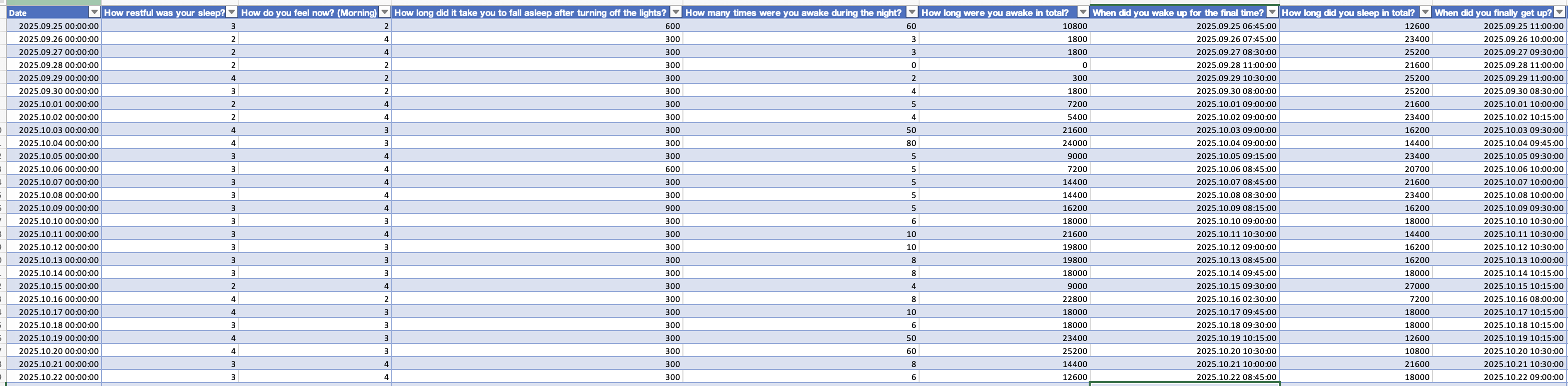
Figure 2: Excerpt from the morning diary as opened in Excel
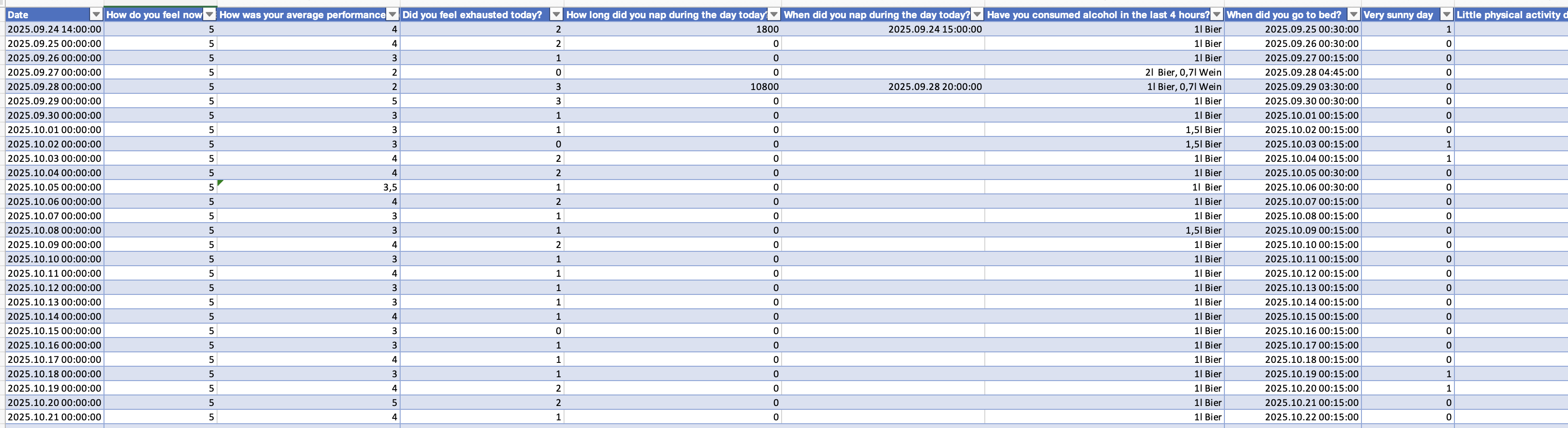
Figure 3: Excerpt from the evening diary as opened in Excel

The evening diary is about the prior day, how well and they feel and about their performance during the day, alcohol consumation, when they got to bed, daytime naps and self-assessments about low activity and bright days. See Figure 3 for an excerpt.

In the next step we import these data and combine them to a large table. While none of these steps contain LightLogR functions, it is a crucial step to set the data up right for merging - particularly in that we assign the morning diaries to the prior day, and also add information about performance and fatigue on a given day to the prior day.

7-8. Store the date information of the evening diaries as is, but the morning diary will be set one day back.

  1. By joining these two diaries by their (adjusted) date, morning diary information is related to the prior day evening diary.

22-23. We add the next days performance and fatigue level to all days.

The following table gives a short overview of the states. We will later get to whether a higher rating is better or worse for the individual items.

5 Merging sleep data

Now that the diaries are prepared, we can extract sleep data from the states. The goal for the next code cell is to end with a statechange variable, that has a datetime for every timepoint when a new state occurs.

  1. Calculate sleep timing by adding bedtime and sleepdelay

  2. Reduce the dataset to only sleep and wake times

  3. We transform the data from wide to long format (i.e., consecutive wake-sleep statesd)

6-8. We add an initial wake for the first day

While we are at it, we can also create states according to the Brown et al. (2022) recommendations, which distinguish daytime (wake), evening (pre-sleep), and nighttime (sleep) hours. The LightLogR function sleep_int2Brown() makes this conversion a breeze. By default, the evening phase is set to a length of 3 hours.

  1. Convert the statechanges into intervals, i.e. from datetimes when a state changes to intervals where a state is considered active.

4-6. Add a variable (State.Brown by default) containing the Brown et al. (2022) phases. This function automatically extends the rows to include the pre-sleep phase.

Next, we combine the light dataset with the sleep data.

  1. Combine the two datasets

4-5. Get the start and end datetimes for each state from the Interval column

  1. Assures that the times from the sleep_data dataset are matched up with the light data, even though the light data uses the Central European Time, whereas the sleep states use the default UTC time zone.

  2. Remove times that don’t relate to any state

6 Brown et al. (2022) recommendations

Let’s visualize the newly extended dataset with regards to the Brown et al. (2022) states.

3&11. Grouping by week so that the plot is automatically sectioned into three rows

8-9. The expansion of factor levels is purely so that the order in the legend is automatically kept in sensible order.

  1. Setting the geom to ribbon enables a filled band with the lower band set at 0.

15-17. Coloring and filling by the Brown states will only look good, if each section is kept individually. consecutive_id() ensures just this.

18-20. Manually setting the datetime limits ensures that each row is kept at 7 days

23-24. We add a check whether the recommendations were fulfilled and color by it.

  1. Adjusting the height of the state bands ensures readability of the plot despite other color aspects.

32-33. As the week grouping is just for row-setting, we are not interested in the strip and thus remove it.

We can further summarize the compliance to the recommendations in a table.

7 Calculate metrics

In this section, we calculate some light metrics that we can correlate with sleep quality. We calculate these metrics not by the 24-hour day, but rather by wake-sleep rhythms.

7.1 Sleep-wake cycles

  1. Create a consecutive numbering per sleep-wake cycle. Beware if states are missing in other analyses!

  2. Format the sleep-wake cycles nicely

Let’s look at the sleep times as a doubleplot.

  1. Create a logical as the main variable that is TRUE when the state is sleep

  2. Showing the next day in the doubleplot

5-6. Remove the default fill settings to provide your own

Again, we can look at the data as a table.

Based on these results, we will remove cycle 01 and cycle 20, as they have only partial data.

7.2 Light exposure metrics

For the last step, we will calculate two relevant light exposure metrics, time above 250 lx mel EDI and dose. and add this information to the original states.

  1. This step relates the sleep cycles to the date where the wake-state starts.

  2. Adding the self-assessments to our summaries. The data (4) provides the right assignment.

We bring this information together into a comprehensive table. Variables that have no meaningful variance are removed.

8 Correlations

To visualize simple correlations between the self-assessments and the light exposure metrics we create a helper function:

This allows us to easily look at the various parameters

Try these for yourself by copying them into the active code cell. Could there be a meaningful relationship?

9 Conclusion

Congratulations! You have finished this section of the advanced course. If you go back to the homepage, you can select one of the other use cases.

Footnotes

  1. https://doi.org/10.1371/journal.pbio.3001571↩︎

  2. If you want to know more about webR and the Quarto-live extension that powers this document, you can visit the documentation page↩︎

Source Code
---
title: "Use case #02: Case, light sensitivity"
subtitle: "Open and reproducible analysis of light exposure and visual experience data (Advanced)"
author: 
  - name: "Johannes Zauner"
    affiliation: "Technical University of Munich & Max Planck Institute for Biological Cybernetics, Germany"
    orcid: "0000-0003-2171-4566"
format: live-html
engine: knitr
page-layout: full
toc: true
number-sections: true
date: last-modified
lightbox: true
code-tools: true
code-line-numbers: true
code-link: true
resources:
  - data/case_light_sensitivity/
webr:
  packages:
    - LightLogR
    - tidyverse
    - gt
    - readxl
    - gtsummary
    - plotly
  repos:
    - https://tscnlab.r-universe.dev
    - https://cloud.r-project.org
---

{{< include ./_extensions/r-wasm/live/_knitr.qmd >}}

## Preface

A single patient reports worse sleep after bright days. Consequently, personal light exposure and activity was captured with wearable devices for several weeks. Additionally, morning and evening questionnaires were used to capture sleep, performance, and well-being self evaluations. In this tutorial, we focus on the ActLumus device worn on the chest and the self evaluations.

::: {#fig-overview layout-ncol=2}

![Wearing position ActTrust2 (actigraphy)](assets/advanced/wrist.png) 

![Wearing position ActLumus (light exposure)](assets/advanced/chest.png)
:::

The tutorial focuses on

- import and merging of diary data with light data

- calculation of metrics based on sleep-wake cycles instead of calendar days

- relating exposure metrics to self assessments of consecutive sleep, performance, and wellbeing

- assessing compliance to Brown et al. (2022)[^1] recommendations

[^1]: https://doi.org/10.1371/journal.pbio.3001571

{{< include _how_this_page_works-live.qmd >}}

## Setup

We start by loading the necessary packages.

```{webr}
#| label: setup
#| eval: false
library(LightLogR) # main package
library(tidyverse) # for tidy data science
library(gt) # for great tables
library(readxl) # to read in Excel files
library(ggridges) # for stacked plots within a panel
library(gtsummary) # for automatic summaries
```

```{webr}
#| edit: false
# set a global theme for the background
theme_set(
    theme(
      panel.background = element_rect(fill = "white", color = NA)
    )
)
```

## Import

We require both light and log data to be loaded into R before we are able to merge them.

### Light

Light data were captured with `ActLumus` devices. The exported data files sit in `data/case_light_sensitivity/`.

```{webr}
#| label: context
#| fig-height: 2
#| fig-width: 6
file <- "data/case_light_sensitivity/Log_5153_20251028143545799.txt"
tz <- "Europe/Berlin"
coordinates <- c(48.78, 9.18) #Stuttgart, Germany
data <- import$ActLumus(file, tz = tz, manual.id = "ID001") #<4>
```

4. As there is only one participant, we set a manual `Id`

This dataset spans about three weeks. We know that the diaries only start on 24 September 2025 - thus we remove prior data. We also test for irregular data or gaps in this trimmed dataset.

```{webr}
#| label: gap checks
data <- 
  data |> 
  filter_Date(start = "2025-09-24") |> #<3>
  ungroup() |>  #<4>
  select(Datetime, MEDI) 
data |> has_gaps()
data |> has_irregulars()
```

3. If we have a hard-set beginning or end time, `filter_Date()` or `filter_Datetime()` provide convenient cut-off functionality.

4. As we are dealing with a single participant, we don't require grouping by `Id`.

We can continue, seeing as there are no issues with the regular time series. We start by plotting the full series

```{webr}
#| label: first visualization
#| fig-height: 3
#| fig-width: 20
 data|> 
  aggregate_Datetime("15 minutes") |> #<2>
  gg_days(x.axis.format = "%a %d/%m") |> #<3>
  gg_photoperiod(coordinates)
```

2. Reduce the interval by averaging over 15 minute periods

3. Easily change the label format. Look at the help page of [`?strptime`](https://www.rdocumentation.org/packages/base/versions/3.6.2/topics/strptime) for the available syntax.

We can see the light intensity varies greatly. Let's look at the extremes.

```{webr}
#| label: highest light exposure
#| fig-height: 5
 data|> 
  aggregate_Datetime("5 minutes") |>
  add_Date_col(group.by = TRUE) |> #<3>
  sample_groups(n=3, #<4>
                order.by = #<5>
                  duration_above_threshold(MEDI, Datetime, threshold = 250)#<6>
                  ) |> #<7>
  ungroup(Date) |> 
  gg_doubleplot(type = "repeat") |>
  gg_photoperiod(coordinates) +
  labs(title = "Three days with highest time above 250 lx mel EDI")
```

3. Adding, and grouping by, the date gives us 20 groups, each covering one calender day

4-7. Select the three groups with the highest duration above 250 lx mel EDI

Looking at the first half of `02 October 2025`, we can already see that this likely a period of non-wear, or sleep - this, we have to come back to later.

```{webr}
#| label: lowest light exposure
#| fig-height: 5
 data|> 
  aggregate_Datetime("5 minutes") |>
  add_Date_col(group.by = TRUE) |>
  sample_groups(n=3, 
                sample = "bottom", #<1>
                order.by = 
                  duration_above_threshold(MEDI, Datetime, threshold = 250)
                ) |> 
  ungroup(Date) |> 
  gg_doubleplot(type = "repeat") |>
  gg_photoperiod(coordinates) +
  labs(title = "Three days with lowest time above 250 lx mel EDI")
```

1. Select the three groups with the lowest duration above 250 lx mel EDI

### State data

We need information about sleep times. These can be found in the diaries.

The morning diary is all about last nights sleep, how long the needed to fall asleep, wake-ups during the night, when they got up, how rested they feel and about sleep medication. See @fig-morning for an excerpt.

![Excerpt from the morning diary as opened in Excel](assets/advanced/morning_protocol.png){#fig-morning}

![Excerpt from the evening diary as opened in Excel](assets/advanced/evening_protocol.png){#fig-evening}

The evening diary is about the prior day, how well and they feel and about their performance during the day, alcohol consumation, when they got to bed, daytime naps and self-assessments about low activity and bright days. See @fig-evening for an excerpt.

In the next step we import these data and combine them to a large table. While none of these steps contain `LightLogR` functions, it is a crucial step to set the data up right for merging - particularly in that we assign the morning diaries to the prior day, and also add information about performance and fatigue on a given day to the prior day.

```{webr}
#| label: Import daily diaries
state_path1 <- "data/case_light_sensitivity/evening_protocol.xlsx"
state_path2 <- "data/case_light_sensitivity/morning_protocol.xlsx"

state_evening <- read_excel(state_path1)
state_morning <- read_excel(state_path2)

state_evening$Date <- date(state_evening$Date) #<7>
state_morning$Date <- date(state_morning$Date - days(1)) #<8>
states <- left_join(state_evening, state_morning, by = "Date") #<9>

labels_states <- 
  names(states) |> 
  set_names(c("Date", "wellbeing.evening", "performance", "fatigue", 
              "daysleep.duration", "daysleep.start", "alcohol", "bedtime", 
              "sunny.day", "low.movement",
              "sleepquality", "wellbeing.morning", "sleepdelay", 
              "sleepinterruptions", "sleepinterruptions.duration", "wakeup", 
              "sleepduration", "outofbed", "medication"))
names(states) <- names(labels_states)

states <- 
  states |> mutate(performance.next = lead(performance), #<22>
                   fatigue.next = lead(fatigue)) #<23>
names(states)
```

7-8. Store the date information of the evening diaries as is, but the morning diary will be set one day back.

9. By joining these two diaries by their (adjusted) date, morning diary information is related to the prior day evening diary.

22-23. We add the next days performance and fatigue level to all days.

The following table gives a short overview of the states. We will later get to whether a higher rating is better or worse for the individual items.

```{webr}
states |> 
  set_names(c(labels_states, "Performance next day", "Fatigue next day")) |>  
  tbl_summary(include = where(is.numeric))
```


## Merging sleep data

Now that the diaries are prepared, we can extract sleep data from the states. The goal for the next code cell is to end with a `statechange` variable, that has a datetime for every timepoint when a new state occurs.

```{webr}
#| label: create sleep data
sleep_data <-
  states |>
  mutate(sleep = bedtime + sleepdelay) |> #<3>
  select(sleep, wake = wakeup) |> #<4>
  pivot_longer(everything(), names_to = "state") |> #<5>
  add_row(state = "wake", #<6>
          value = as.POSIXct("2025-09-24 14:00:00", tz = "UTC"), #<7>
          .before = 1) #<8>
sleep_data |> head()
```

3. Calculate sleep timing by adding bedtime and sleepdelay

4. Reduce the dataset to only sleep and wake times

5. We transform the data from wide to long format (i.e., consecutive wake-sleep statesd)

6-8. We add an initial `wake` for the first day

While we are at it, we can also create states according to the *Brown et al. (2022)* recommendations, which distinguish daytime (`wake`), evening (`pre-sleep`), and nighttime (`sleep`) hours. The `LightLogR` function `sleep_int2Brown()` makes this conversion a breeze. By default, the evening phase is set to a length of `3 hours`.

```{webr}
#| label: create brown states
sleep_data <-
  sleep_data |> 
  sc2interval(value, state) |> #<3>
  sleep_int2Brown(Brown.night = "sleep", #<4>
                  Brown.day = "wake", #<5>
                  Brown.evening = "pre-sleep") #<6>
sleep_data |> head()
```

3. Convert the `statechanges` into `intervals`, i.e. from datetimes when a state changes to intervals where a state is considered `active`.

4-6. Add a variable (`State.Brown` by default) containing the *Brown et al. (2022)* phases. This function automatically extends the rows to include the `pre-sleep` phase.

Next, we combine the light dataset with the sleep data.

```{webr}
#| label: combine datasets
data_ext <- 
data |> 
  add_states(sleep_data, #<3>
             start.colname = Interval, #<4>
             end.colname = Interval, #<5>
             force.tz = TRUE) |> #<6>
  drop_na(state) |> #<7>
  add_photoperiod(coordinates) |> 
  Brown2reference(
                  Brown.day = "wake",
                  Brown.evening = "pre-sleep",
                  Brown.night = "sleep")

data_ext |> head() |> gt()
```

3. Combine the two datasets

4-5. Get the start and end datetimes for each state from the `Interval` column

6. Assures that the times from the `sleep_data` dataset are matched up with the light data, even though the light data uses the `Central European Time`, whereas the sleep states use the default `UTC` time zone.

7. Remove times that don't relate to any state

## Brown et al. (2022) recommendations

Let's visualize the newly extended dataset with regards to the *Brown et al. (2022)* states.

```{webr}
#| autorun: true
color_palette <-
  c(
    wake =           "#0073C2FF",
    `pre-sleep` =    "#EFC000FF",
    sleep =          "#868686FF",
    compliant =      "#658354",
    `non-compliant` = "#CD534CFF"
  )
print("already executed")
```


```{webr}
#| label: visualize datasets
#| fig-height: 6
#| fig-width: 12
#| message: false
#| warning: false
data_ext |>
  aggregate_Datetime("15 mins") |>
  mutate(week = week(Datetime), #<3>
         week = paste0("week: ", week), #<4>
         Reference.check = 
           case_when(Reference.check ~ "compliant",
                     !Reference.check ~ "non-compliant"),
         State.Brown = fct_expand(State.Brown, "compliant", "non-compliant") |> #<8>
                       fct_relevel("wake") #<9>
  ) |> 
  group_by(week) |> #<11>
  gg_days(geom = "ribbon", #<12>
          alpha = 0.8,
          lwd = 0.5,
          aes_col = State.Brown, #<15>
          aes_fill = State.Brown, #<16>
          group = consecutive_id(State.Brown), #<17>
          x.axis.limits = \(x) { #<18>
            Datetime_limits(x, length = ddays(6), midnight.rollover = TRUE) #<19>
            } #<20>
          ) |> 
  gg_photoperiod(alpha = 0.1) |> 
  gg_states(Reference.check, #<23>
            aes_fill = Reference.check, #<24>
            ymax = -0.1, ymin = -0.5, #<25>
            alpha = 1) + 
  labs(fill = "Brown et al.",
       caption = 
         "Brown et al. (2022) recommendations are ≥ 250 lx melanopic EDI (mel EDI) during daytime (wake) hours,\n≤ 10 lx mel EDI in the evening (pre-sleep), and ≤ 1 lx mel EDI at night (sleep)") +
  guides(color = "none") +
  scale_fill_manual(values = color_palette) +
  theme_sub_strip(background = element_blank(), #<32>
                  text.y = element_blank()) #<33>
```

3&11. Grouping by week so that the plot is automatically sectioned into three rows

8-9. The expansion of factor levels is purely so that the order in the legend is automatically kept in sensible order.

12. Setting the geom to `ribbon` enables a filled band with the lower band set at 0.

15-17. Coloring and filling by the Brown states will only look good, if each section is kept individually. `consecutive_id()` ensures just this.

18-20. Manually setting the datetime limits ensures that each row is kept at 7 days

23-24. We add a check whether the recommendations were fulfilled and color by it.

25. Adjusting the height of the state bands ensures readability of the plot despite other color aspects.

32-33. As the week grouping is just for row-setting, we are not interested in the strip and thus remove it.

We can further summarize the compliance to the recommendations in a table.

```{webr}
data_ext |> 
  group_by(State.Brown) |> 
  summarize(`Relative compliance` = sum(Reference.check)/n(),
            `Relative duration` = n()) |> 
  mutate(`Relative duration` = `Relative duration` / sum(`Relative duration`),
         State.Brown = fct_relevel(State.Brown, "wake")
  ) |> 
  arrange(State.Brown) |> 
  gt() |> 
  fmt_percent(decimals = 0)
```

## Calculate metrics

In this section, we calculate some light metrics that we can correlate with sleep quality. We calculate these metrics not by the 24-hour day, but rather by wake-sleep rhythms.

### Sleep-wake cycles

```{webr}
data_sw <-
data_ext |> 
  add_Date_col() |> 
  number_states(state, use.original.state = FALSE) |> #<1>
  mutate(
    sleep.wake = sprintf("cycle %02.f", state.count) |> factor(), #<2>
    .before = 1) |> 
  group_by(sleep.wake)

data_sw
```

4. Create a consecutive numbering per sleep-wake cycle. Beware if states are missing in other analyses!

6. Format the sleep-wake cycles nicely

Let's look at the sleep times as a doubleplot.

```{webr}
data_sw |> 
  ungroup() |>
  gg_heatmap(state == "sleep", #<3>
             doubleplot = "next", #<4>
             fill.remove = TRUE) + #<5>
  scale_fill_manual(values = c("TRUE" = "black", "FALSE" = "#00000000")) + #<6>
  guides(fill = "none") +
  labs(title = "        Doubleplot of sleep times") +
  theme(
  strip.background = element_blank(),
  strip.text.y = element_blank(),
  strip.placement = "inside")
```

3. Create a logical as the main variable that is `TRUE` when the state is `sleep`

4. Showing the next day in the doubleplot

5-6. Remove the default fill settings to provide your own

Again, we can look at the data as a table.

```{webr}
data_sw |> durations() |> ungroup() |> gt()
```

Based on these results, we will remove `cycle 01` and `cycle 20`, as they have only partial data.

```{webr}
data_sw <-
  data_sw |> filter(!sleep.wake %in% c("cycle 01", "cycle 20"))
data_sw$sleep.wake |> unique()
```

### Light exposure metrics

For the last step, we will calculate two relevant light exposure metrics, `time above 250 lx mel EDI` and `dose`. and add this information to the original `states`.

```{webr}
summaries_sw <- 
data_sw |> 
  summarize(
    Date = min(Date), #<4>
    dose(MEDI, Datetime, as.df = TRUE),
    duration_above_threshold(MEDI, Datetime, threshold = 250, as.df = TRUE)
  ) |> 
  left_join(states, by = "Date") #<8>
summaries_sw |> head()
```

4. This step relates the sleep cycles to the date where the wake-state starts.

8. Adding the self-assessments to our summaries. The data (4) provides the right assignment.

We bring this information together into a comprehensive table. Variables that have no meaningful variance are removed.

```{webr}
summaries_sw |> 
  select(Date, sleep.wake, dose, duration_above_250,
         wellbeing.morning, sunny.day, low.movement, performance, 
         fatigue, bedtime, sleepquality, sleepduration, 
         sleepinterruptions, sleepinterruptions.duration) |> 
  gt() |> 
  fmt_number(dose, decimals = 0) |>
  fmt_duration(c(duration_above_250, sleepduration, sleepinterruptions.duration), 
               input_units = "seconds") |> 
  fmt_time(bedtime) |> 
  fmt(c(sunny.day, low.movement), fns = \(x) ifelse(x, "Yes", "No")) |> 
  tab_header("Overview of daily light exposure metrics and key questionnaire data") |> 
  tab_spanner("Light exposure", columns = c(dose, duration_above_250)) |> 
  tab_spanner("Self-report", columns = wellbeing.morning:fatigue) |> 
  tab_spanner("Self-reported sleep", columns = bedtime:sleepinterruptions.duration) |> 
  cols_label(sleep.wake = "Sleep-wake",
             dose = "Dose mel EDI (lx·h)",
             duration_above_250 = "Time above 250lx mel EDI",
             wellbeing.morning = "Wellbeing next morning",
             sunny.day = "Sunny day",
             low.movement = "Low activity",
             performance = "Performance",
             fatigue = "Fatigue",
             bedtime = "Bedtime",
             sleepquality = "Sleep quality",
             sleepduration = "Sleep duration",
             sleepinterruptions = "Sleep interruptions",
             sleepinterruptions.duration = "Interruption duration"
             ) |> 
  tab_footnote("Higher is worse", locations = cells_column_labels(c(8, 9, 11, 13, 14))) |> 
  sub_missing()
```

## Correlations

To visualize simple correlations between the self-assessments and the light exposure metrics we create a helper function:

```{webr}
#| autorun: true
time2hour <- function(x) x/3600
correlation_plot <- function(variable, label) {
  summaries_sw |> 
  #prepare the light exposure variables and bedtime variable:
  mutate(
    bedtime = hms::as_hms(bedtime) |> as.numeric() |> time2hour(),
    duration_above_250 = as.numeric(duration_above_250),
    duration_above_250 = 
      (duration_above_250 - min(duration_above_250))/
      (max(duration_above_250)-min(duration_above_250))*max(dose)/1000,
    dose = dose/1000
         ) |> 
  #create the ggplot:
  ggplot(aes(y = {{ variable }})) +
  geom_smooth(method = "lm", 
              aes(x = dose), 
              col = "#2E6F40", 
              fill = "#2E6F40") +
  geom_smooth(method = "lm", 
              aes(x = duration_above_250), 
              col = "#990011", 
              fill = "#990011") +
  geom_point(aes(x = dose), 
             col = "#2E6F40") +
  geom_point(aes(x = duration_above_250), 
             col = "#990011", size = 1) +
  scale_x_continuous(
    "Melanopic EDI dose (klx·h)",
    sec.axis = sec_axis(~ (.*1000/70280*23400 - 5580)/3600, 
                        name = "Time above 250 lx (h)")
  ) +
  cowplot::theme_cowplot() +
  theme_sub_axis_bottom(title = element_text(color = "#2E6F40"),
                        text = element_text(color = "#2E6F40")) +
  theme_sub_axis_top(title = element_text(color = "#990011"),
                        text = element_text(color = "#990011")) +
  labs(y = label) 
}
print("already executed")
```

This allows us to easily look at the various parameters

```{webr}
#| message: false
#| warning: false
#| label: correlations
correlation_plot(wellbeing.morning, 
                 "Wellbeing on the next\nmorning (higher = better)")
```


```{webr}
#| message: false
#| warning: false
correlation_plot(sleepquality, "Sleep quality\n(higher = worse")
```

Try these for yourself by copying them into the active code cell. Could there be a meaningful relationship?

```{webr}
#| eval: false
correlation_plot(performance, "Performance during\nthe day (higher = worse)")
correlation_plot(performance.next, 
                 "Performance on the\n next day (higher = worse)")
correlation_plot(sleepduration/3600, "Sleep duration (h)")
correlation_plot(fatigue, "Fatigue during the day\n(higher = worse)")
correlation_plot(fatigue.next, "Fatigue on the next day\n(higher = worse)")
correlation_plot(sleepinterruptions, "Sleep interruptions")
correlation_plot(sunny.day, "Self-assessed sunny day")
correlation_plot(low.movement, "Self-assessed low activity")
```

```{webr}
#| message: false
#| warning: false

```


{{< include _conclusion.qmd >}}
  • Edit this page
  • Report an issue