Use case #01: A day in daylight
Open and reproducible analysis of light exposure and visual experience data (Advanced)
Johannes Zauner 
1 Preface
On the September 2025 equinox, over 50 participants across the globe logged and annotated their daily light exposure. While not a (traditional) study, the data is extraordinarily well suited to explore a diverse dataset across many participants in terms of geolocation, device-type, and contextual information, as participants logged their statechanges via a smartphone application. The dataset were analysed and presented as part of the A Day in Daylight event on 3 November 2025. They can be explored in an interactive dashboard. For this use case, we will take a subset of the datasets to explore workflows for these conditions, and summarize the data by combining it with activity logs and participant demographics.
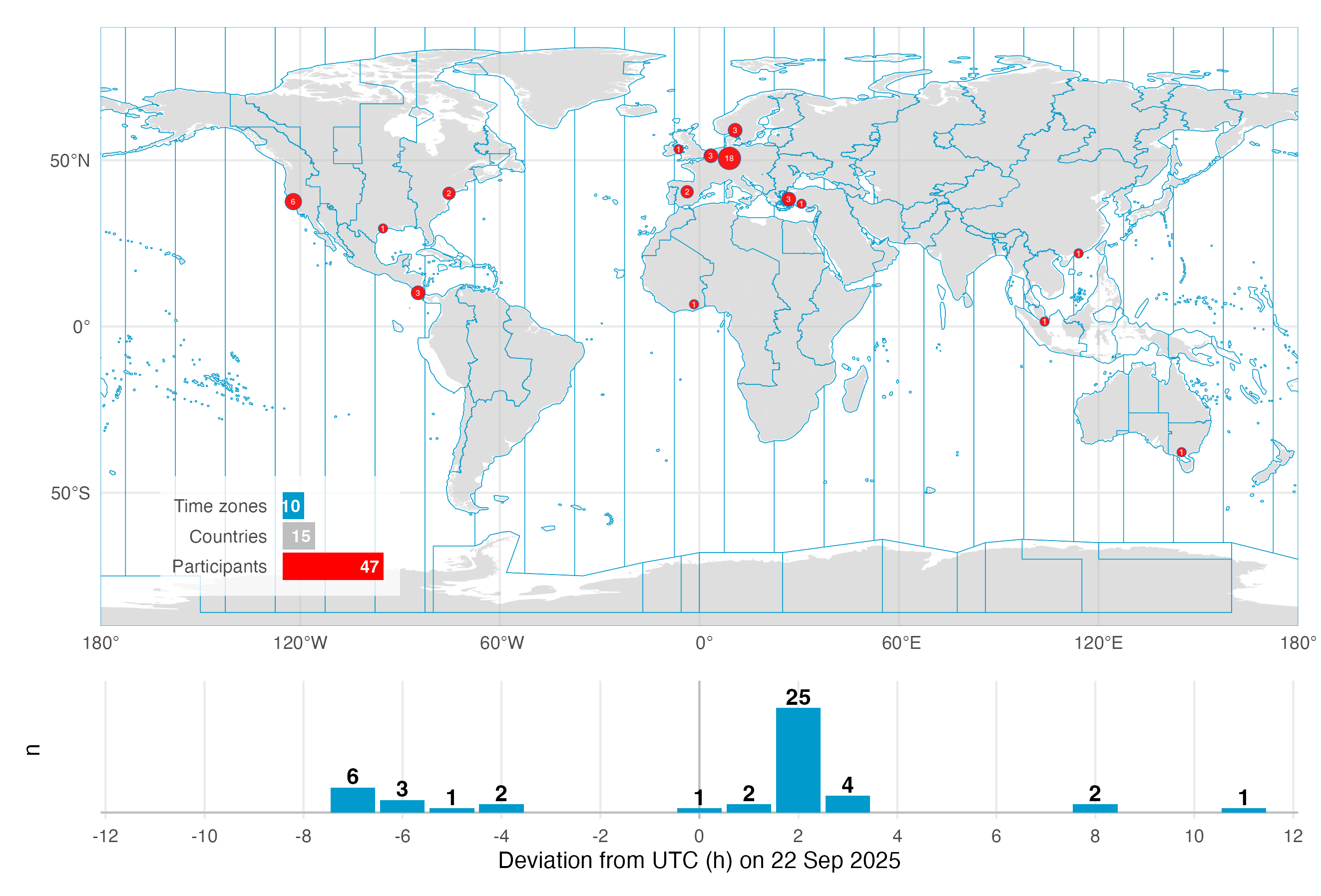
The tutorial focuses on
setting up the import from multiple devices and time zones
handling multiple time zones once the data is imported
handling a large number of participants in a study
adding to and analysing participant-specific data (sex, age,…)
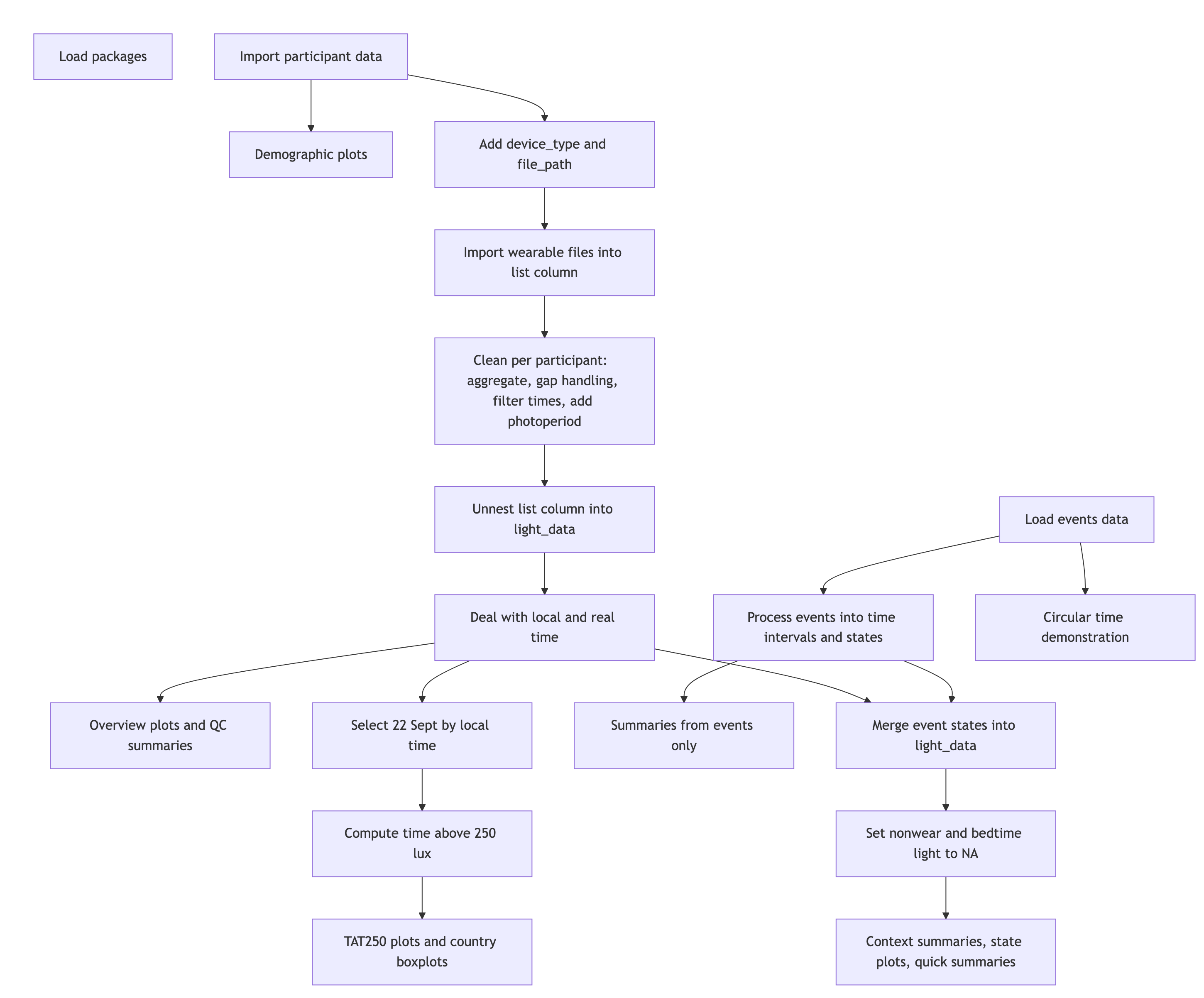
2 How this page works
This document contains the script for the online course series as a Quarto script, which can be executed on a local installation of R. Please ensure that all libraries are installed prior to running the script.
If you want to test LightLogR without installing R or the package, try the script version running webR, for a autonymous but slightly reduced version. These versions are indicated as (live), whereas the current version is considered (static), as it is pre-rendered.
To run this script, we recommend cloning or downloading the GitHub repository (link to Zip-file) and running the respective script. You will need to install the required packages. A quick way is to run:
3 Recording
You can follow along with the recordings to get even more context about the workflow in LightLogR.
4 Setup
We start by loading the necessary packages.
5 Import
Import works differently in this use case, because we import from different time zones and also devices. Would all devices be the same, or would the recordings have all happened in a single time zone, we would simply bulk import with import$device(files, tz)
5.1 Participant data
First, we collect a list of available data sets. Data are stored in a zip folder under data/a_day_in_daylight/lightloggers.zip.
- 1
- Collect a table of the files contained in the zip folder
- 2
- Pull out the filenames from the table
- 3
-
remove file extenstions (
.txt) - 4
-
unzip all the files into the
lightloggerssubfolder
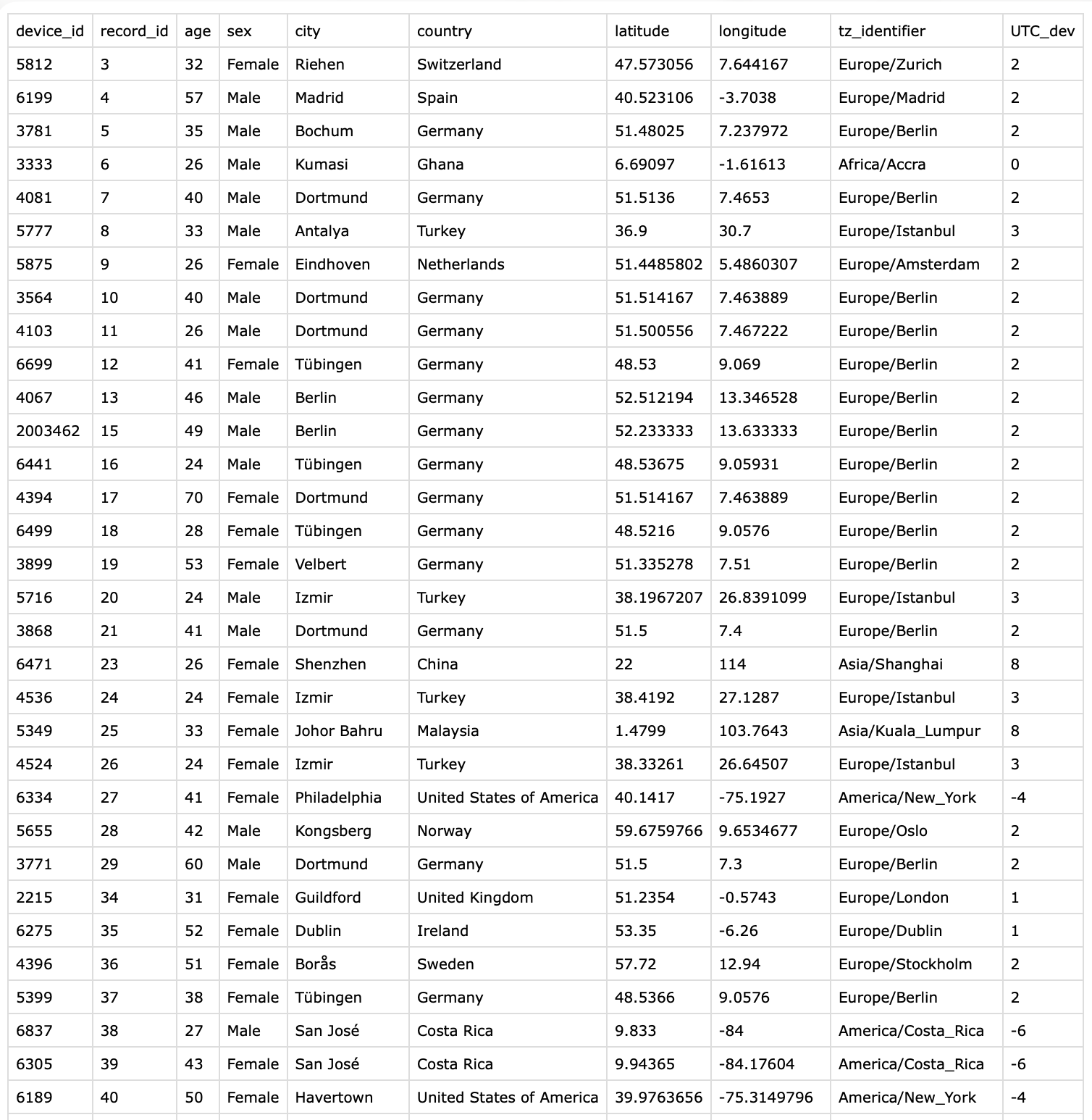
[1] "2003249" "2003462" "2215" "3333" "3564" "3771" Next we check which devices are declared in the participant metadata collected via a REDCap survey. We want to compare whether the device id’s from the file names match with the survey. Figure 1 shows the structure of the CSV file.
- 1
- Collect device id’s from survey
- 2
- Check whether any entries are duplicated
- 3
- Check whether all the files in the zip folder are represented in the survey
Rows: 47 Columns: 10
── Column specification ────────────────────────────────────────────────────────
Delimiter: ","
chr (4): sex, city, country, tz_identifier
dbl (6): device_id, record_id, age, latitude, longitude, UTC_dev

ℹ Use `spec()` to retrieve the full column specification for this data.
ℹ Specify the column types or set `show_col_types = FALSE` to quiet this message.[1] 0
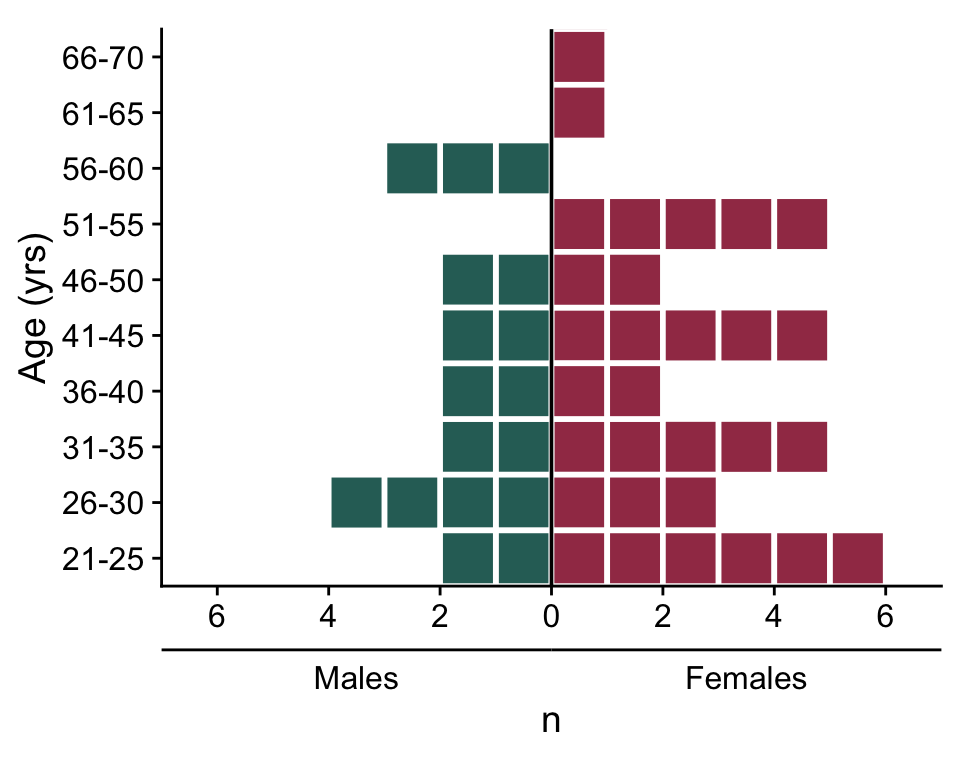
[1] TRUEBefore we import the wearable data, let’s make a plot of participants’ age(group) and sex.
5.2 Plot demographic data
First, we create a helper for the axis to indicate the sexes.
Then we create the actual plot:
participant_data |>
  mutate(
1         age_group =
           cut(age,
               breaks = seq(20,70,5),
               labels = paste(4:13*5+1, 5:14*5, sep = "-"),
               right = TRUE,
               ordered_result = TRUE),
         ) |>
2  summarize(n = n(), .by = c(sex, age_group)) |>
3  uncount(n) |>
  mutate(unit = row_number() - 0.5,
         unit = if_else(sex == "Male", -unit, unit),
         .by = c(sex, age_group)) |>
4  mutate(n = ifelse(sex == "Male", -1, 1)) |>
  ggplot(aes(y= age_group, x = unit, fill = sex)) +
  geom_tile(col = "white", lwd = 1) +
  geom_vline(xintercept = 0) +
  scale_x_continuous(breaks = seq(-6,6, by = 2),
                     labels = c(6, 4, 2, 0, 2, 4, 6)) +
  scale_fill_manual(values = c(Male = "#2D6D66", Female = "#A23B54")) +
  guides(fill = "none", alpha = "none",
         x = guide_axis_stack(
           "axis", sex_lab
         )) +
  cowplot::theme_cowplot() +
  coord_equal(xlim = c(-7, 7), expand = FALSE) +
labs(y = "Age (yrs)", x = "n")- 1
- Convert age into age groups (length of five years)
- 2
- Get the number of participants per age group and sex
- 3
- Replicate each row n times
- 4
- Change sign for males’ n
5.3 Import wearable data
Next, we import the light data. We do this inside participant_data. If you are not used to list columns inside dataframes, do not worry - we will take this one step at a time.
There are two devices in use: ActLumus and ActTrust. We need to import them separately, as they are using different file formats and thus import functions. In our case, device_id with four numbers indicates an ActLumus device, whereas seven numbers indicates an ActTrust. We add a column to the data indicating the Type of device in use. We also make sure that the spelling equals the supported_devices() list from LightLogR. Then we construct filename paths for all files.
data <-
participant_data |>
  mutate(
    device_type = case_when(str_length(device_id) == 4 ~ "ActLumus",
                            str_length(device_id) == 7 ~ "ActTrust"
                            ),
    file_path = glue("data/a_day_in_daylight/lightloggers/{device_id}.txt")
    )
data |>
  select(device_id, tz_identifier, device_type, file_path) |>
  slice_head(n=5) |>
gt()| device_id | tz_identifier | device_type | file_path |
|---|---|---|---|
| 5812 | Europe/Zurich | ActLumus | data/a_day_in_daylight/lightloggers/5812.txt |
| 6199 | Europe/Madrid | ActLumus | data/a_day_in_daylight/lightloggers/6199.txt |
| 3781 | Europe/Berlin | ActLumus | data/a_day_in_daylight/lightloggers/3781.txt |
| 3333 | Africa/Accra | ActLumus | data/a_day_in_daylight/lightloggers/3333.txt |
| 4081 | Europe/Berlin | ActLumus | data/a_day_in_daylight/lightloggers/4081.txt |
With this information we import our datasets into a column called light_data. Because this is going to be a list-column, we use the map family of functions from the {purrr} package, as they output a list for each input. Input, in our case, it the device_type, file_path, and tz_identifier in each row. Because the file names contain nothing but the Id, we don’t have to specify anything to the import function regarding Id, as the filename will be used by default.
- 1
-
pmap()takes a list of arguments, provides them row-by-row to a function, and outputs a list of results. - 2
-
Inputs to our import function. In our case, because we are using the
pmap()insidemutate, we can directly reference the dataset variables. - 3
- The function we want to be executed based on the inputs
- 4
-
LightLogR’s import function. We provide the arguments in the correct spot. Because we do not want to have 47 individual summaries and overview plots, we set the import to silent.
We end with one dataset per row entry. Let us have a look.
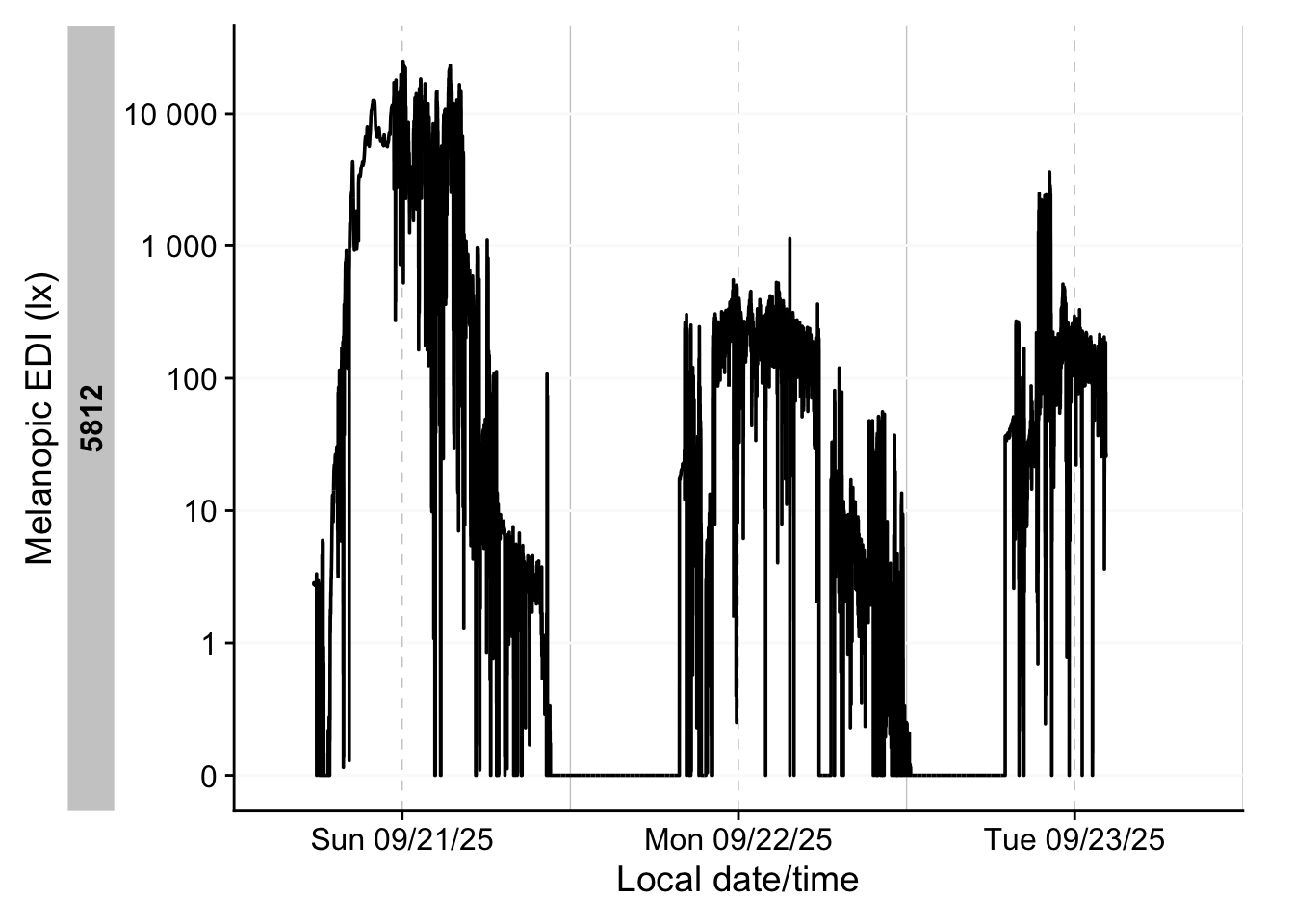
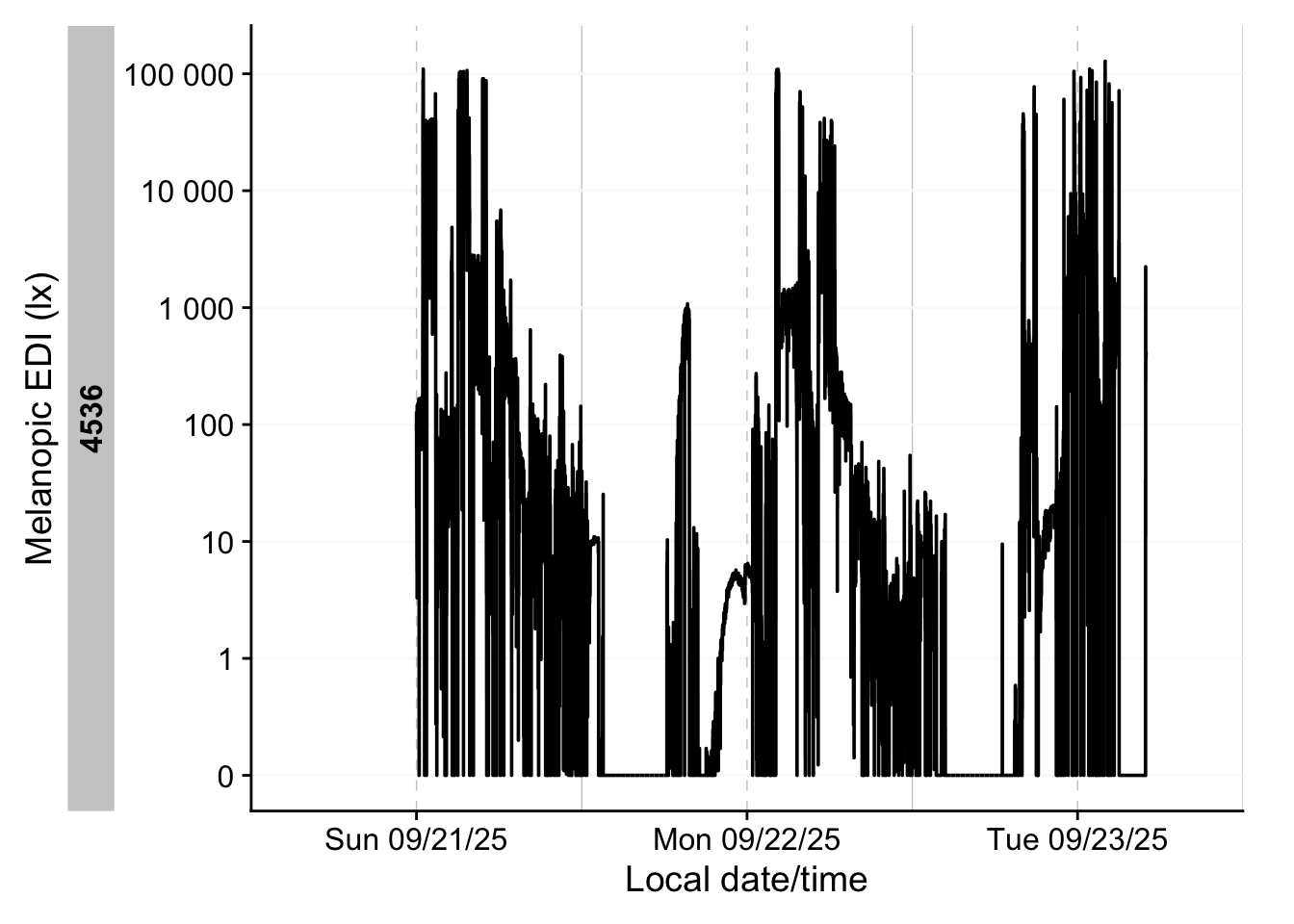
What about the import summary? We can still import the data the normal way (at least for one device type) - while they will all share the same time zone, it can still be used to get some initial insights about the data.
- 1
-
Select only participants with the
ActLumusdevice - 2
- Remove two files that have a differing number of columns from the others. Likely, this is due to a software export setting. Importing those separately would not be an issue, just the mix is not possible.
- 3
- Import function with standard settings
- 4
- we are not interested in the actual data, just the side effect of the import summary.
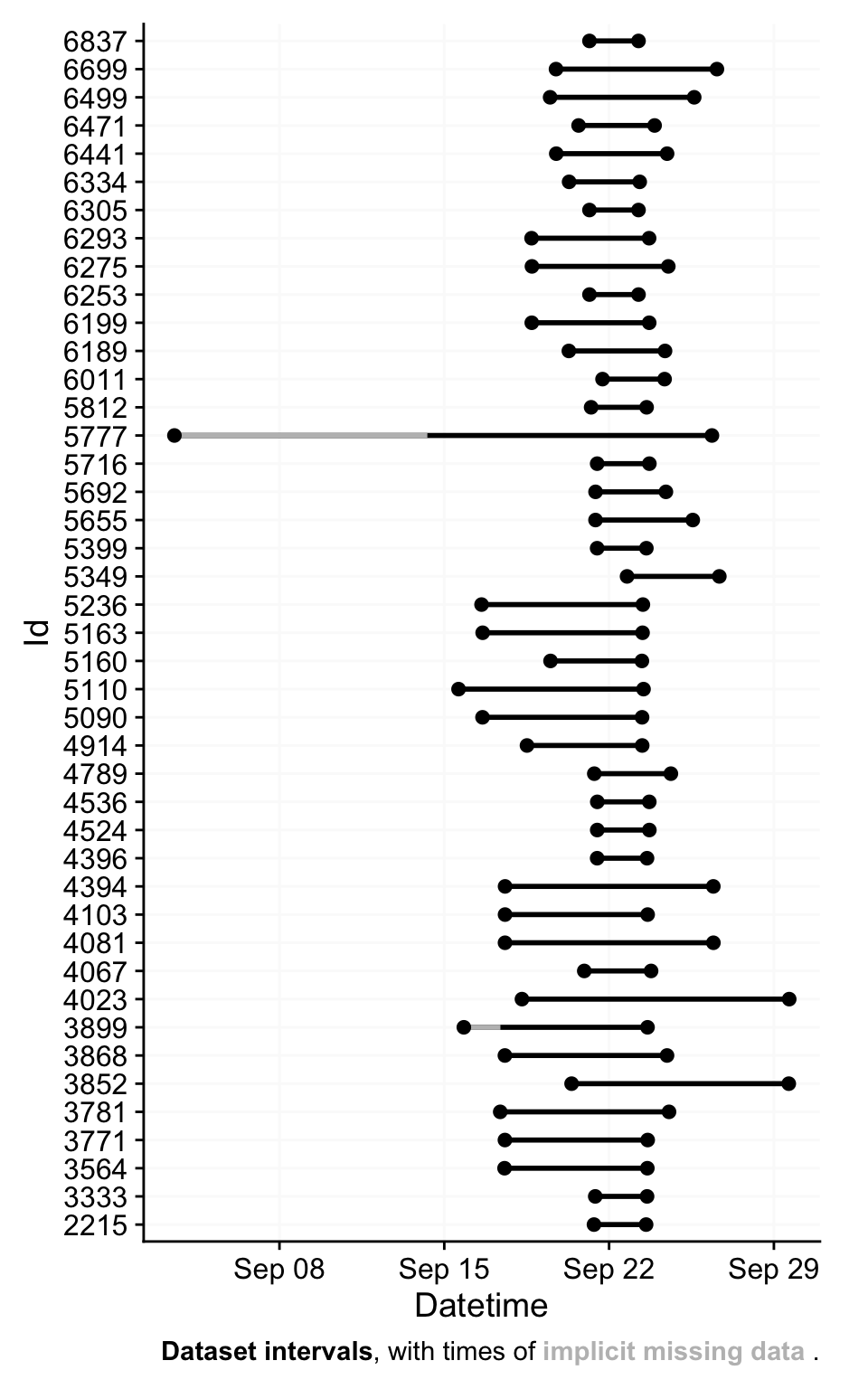
Successfully read in 1'798'693 observations across 43 Ids from 43 ActLumus-file(s).
Timezone set is UTC.
The system timezone is Europe/Berlin. Please correct if necessary!

First Observation: 2025-09-03 12:54:25
Last Observation: 2025-09-29 15:37:15
Timespan: 26 days

Observation intervals:
   Id    interval.time            n pct
 1 2215  10s                  19128 100%
 2 3333  10s                  19018 100%
 3 3564  10s                  52401 100%
 4 3771  10s                  52387 100%
 5 3781  10s                  61946 100%
 6 3852  10s                  79700 100%
 7 3868  10s                  59500 100%
 8 3899  10s                  54083 100%
 9 3899  11s                      1 0%
10 3899  133268s (~1.54 days)     1 0%
# ℹ 51 more rows
6 Light data
6.1 Cleaning light data
In this section we will prepare the light data through the following steps:
resampling data to 5 minute intervals
filling in missing data with explicit gaps
removing data that does not fall between
2025-09-21 10:00:00 UTCand2025-09-23 12:00:00 UTC, which contains all times where 22 September occurs somewhere on the planetcreating a
local_timevariable, which forces theUTCtime zone on all time stamps. When we later merge all datasets, we will haveDatetimeto compare based on real-time measurements, andlocal_timeto compare based on time of day.adding photoperiod information to the data. It will use the
local_timevariable as a basis
data <-
  data |>
  mutate(
    light_data =
      pmap(list(light_data, latitude, longitude),
                  \(x, lat, lon) {
    x |>
1      aggregate_Datetime("5 mins") |>
2      gap_handler(full.days = TRUE) |>
      filter_Datetime(start = "2025-09-21 10:00:00",
                      end = "2025-09-23 12:00:00",
3                      tz = "UTC") |>
4      mutate(local_time = force_tz(Datetime, "UTC"), .before = Datetime) |>
5      add_photoperiod(c(lat, lon), overwrite = TRUE) |>
      mutate(across(c(dusk, dawn), \(x) force_tz(x, "UTC")))
}))- 1
- Resample to 5 mins
- 2
- Put in explicit gaps
- 3
- Only leave a section of data
- 4
-
Adding a
local_timecolum - 5
-
Adding photoperiod information and forcing it to the same time zone as
local_time.
6.2 Visualizing light data
Now we can visualize the whole dataset - first by combining all datasets. There are two ways how to get to the complete dataset. First by joining only the wearable datasets:
1 join_datasets(!!!data$light_data)- 1
-
The
!!!data$light_datais basically equivalent todata$light_data[[1]], data$light_data[[2]],...
# A tibble: 28,128 × 41
# Groups:   Id [47]
   Id    local_time          Datetime            is.implicit EVENT TEMPERATURE
   <fct> <dttm>              <dttm>              <lgl>       <dbl>       <dbl>
 1 5812  2025-09-21 12:00:00 2025-09-21 12:00:00 FALSE           0        31.8
 2 5812  2025-09-21 12:05:00 2025-09-21 12:05:00 FALSE           0        32.0
 3 5812  2025-09-21 12:10:00 2025-09-21 12:10:00 FALSE           0        31.8
 4 5812  2025-09-21 12:15:00 2025-09-21 12:15:00 FALSE           0        31.5
 5 5812  2025-09-21 12:20:00 2025-09-21 12:20:00 FALSE           0        31.1
 6 5812  2025-09-21 12:25:00 2025-09-21 12:25:00 FALSE           0        30.8
 7 5812  2025-09-21 12:30:00 2025-09-21 12:30:00 FALSE           0        30.0
 8 5812  2025-09-21 12:35:00 2025-09-21 12:35:00 FALSE           0        29.3
 9 5812  2025-09-21 12:40:00 2025-09-21 12:40:00 FALSE           0        29.2
10 5812  2025-09-21 12:45:00 2025-09-21 12:45:00 FALSE           0        28.8
# ℹ 28,118 more rows
# ℹ 35 more variables: ORIENTATION <dbl>, PIM <dbl>, PIMn <dbl>, TAT <dbl>,
#   TATn <dbl>, ZCM <dbl>, ZCMn <dbl>, LIGHT <dbl>, IR.LIGHT <dbl>,
#   CAP_SENS_1 <dbl>, CAP_SENS_2 <dbl>, F1 <dbl>, F2 <dbl>, F3 <dbl>, F4 <dbl>,
#   F5 <dbl>, F6 <dbl>, F7 <dbl>, F8 <dbl>, MEDI <dbl>, CLEAR <dbl>,
#   STATE <dbl>, file.name <chr>, dawn <dttm>, dusk <dttm>, photoperiod <drtn>,
#   photoperiod.state <chr>, MS <dbl>, EXT.TEMPERATURE <dbl>, …
Or, and we use this method here, by unnesting the light_data in the data frame. While it requires a manual regrouping by Id, it has the added benefit, that all the participant data is kept with the wearable data.
Note that we are working with two different devices, which export different variables, and also have different measurement qualities. In our specific case, both output a LIGHT variable that denotes photopic illuminance. We thus will use this variable to analyse light in this use case.
In a really study, however, mixing devices would have to be a far more deliberate step, and include some custom calibration.
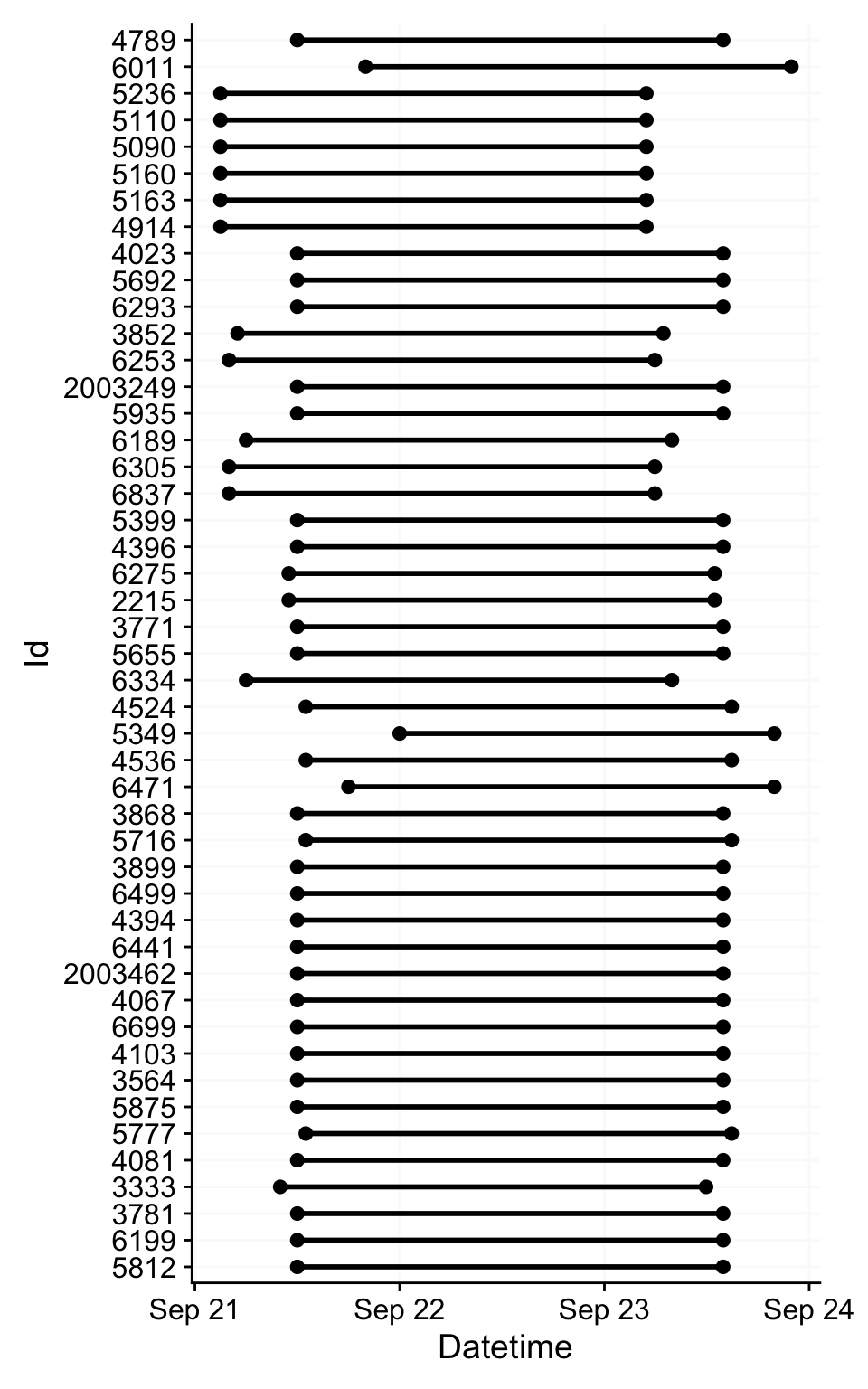
Here are some overviews of the data. With gg_overview():
With summary_overview():
| name | mean | min | max |
|---|---|---|---|
| Participants | 47.00000 | — | — |
| Participant-days | 141.00000 | 3.00000 | 3.000 |
| Days ≥80% complete | 46.00000 | 1.00000 | 1.000 |
| Missing/Irregular | 0.31000 | 0.31000 | 0.730 |
| Photoperiod | 13.16162 | 12.79672 | 13.708 |
And with summary_table()
Warning: There were 42 warnings in `dplyr::summarize()`.
The first warning was:
ℹ In argument: `interdaily_stability(LIGHT, local_time, na.rm = TRUE, as.df =
  TRUE)`.
ℹ In group 4: `Id = 3333`.
Caused by warning in `interdaily_stability()`:
! One or more days in the data do not consist of 24 h.
Interdaily stability might not be meaningful for non-24 h days.
These days contain less than 24 h:
[1] "2025-09-21" "2025-09-22"
ℹ Run `dplyr::last_dplyr_warnings()` to see the 41 remaining warnings.| Summary table | ||||
| TZ: UTC | ||||
| Overview | ||||
|---|---|---|---|---|
| Participants | Participants | 47 | ||
| Participant-days | Participant-days | 141 (3 - 3) | ||
| Days ≥80% complete | Days ≥80% complete | 46 (1 - 1) | ||
| Missing/irregular | Missing/Irregular | 31.0% (31.0% - 73.0%) | ||
| Photoperiod | Photoperiod | 13h 9m (12h 47m - 13h 42m) | 1 | |
| Metrics2 | ||||
| Dose | D (lx·h) | 17,788 ±18,470 (1,891 - 81,883) | ||
| Duration above 250 lx | TAT250 | 5h 3m ±2h 47m (25m - 10h 40m) | ||
| Duration within 1-10 lx | TWT1-10 | 1h 55m ±1h 22m (5m - 6h 35m) | ||
| Duration below 1 lx | TBT1 | 8h 54m ±1h 41m (5h 5m - 13h 10m) | ||
| Period above 250 lx | PAT250 | 1h 51m ±1h 28m (5m - 6h 15m) | ||
| Duration above 1000 lx | TAT1000 | 1h 54m ±1h 35m (0s - 5h 55m) | ||
| First timing above 250 lx | FLiT250 | 10:36 ±03:52 (06:00 - 21:55) | 1 | |
| Mean timing above 250 lx | MLiT250 | 12:17 ±02:53 (04:16 - 17:35) | 1 | |
| Last timing above 250 lx | LLiT250 | 17:24 ±02:21 (11:25 - 23:20) | 1 | |
| Brightest 10h midpoint | M10midpoint | 13:03 ±02:08 (08:35 - 19:55) | 1 | |
| Darkest 5h midpoint | L5midpoint | 03:13 ±04:23 (00:05 - 23:30) | 1 | |
| Brightest 10h mean3 | M10mean (lx) | 289.9 ±265.8 (15.1 - 1,155.8) | ||
| Darkest 5h mean3 | L5mean (lx) | 0.0 ±0.0 (0.0 - 0.0) | ||
| Interdaily stability | IS | 1.000 ±0.000 (1.000 - 1.000) | ||
| Intradaily variability | IV | 1.311 ±0.568 (0.338 - 2.233) | ||
| values show: mean ±sd (min - max) and are all based on measurements of Photopic illuminance (lx) | ||||
| 1 Histogram limits are set from 00:00 to 24:00 | ||||
| 2 Metrics are calculated on a by-participant-day basis (n=46) with the exception of IV and IS, which are calculated on a by-participant basis (n=47). | ||||
| 3 Values were log 10 transformed prior to averaging, with an offset of 0.1, and backtransformed afterwards | ||||
What are the timezones of our two datetime columns now? Let´s find out
# A tibble: 1 × 2
  tz_Datetime   tz_local_time
  <chr>         <chr>
1 Europe/Zurich UTC
Why is that? local_time can be expected, we set it ourselves above. But why is Datetime now converted to Europe/Zurich. Looking at the first row of the participant data, we see that this is the time zone of the first participant:
When merging multiple time zones, the first time zone will be the one all others are converted to. It helps to remember that the underlying data does not change! Time-zone settings merely change the representation of the time points, not their position in time. The same way that a bar of length 254 mm can be expressed as 10 inches, without it changing the length of the bar. But because the first time zone of the participant list is very arbitrary, we will convert it to UTC as well. Instead of force_tz(), which changes the underlying time point, we use with_tz(), which simply changes the representation. Note that this change is merely cosmetic, i.e., it influences what you see when looking at the data in R. All calculations with that variable would be the same either way.
# A tibble: 1 × 2
  tz_Datetime tz_local_time
  <chr>       <chr>
1 UTC         UTC
Then we create border points for the period of interest - start and end points in real time, and in local time, respectively.
Then we plot all the datasets. Figure 2 shows how they relate in real time.
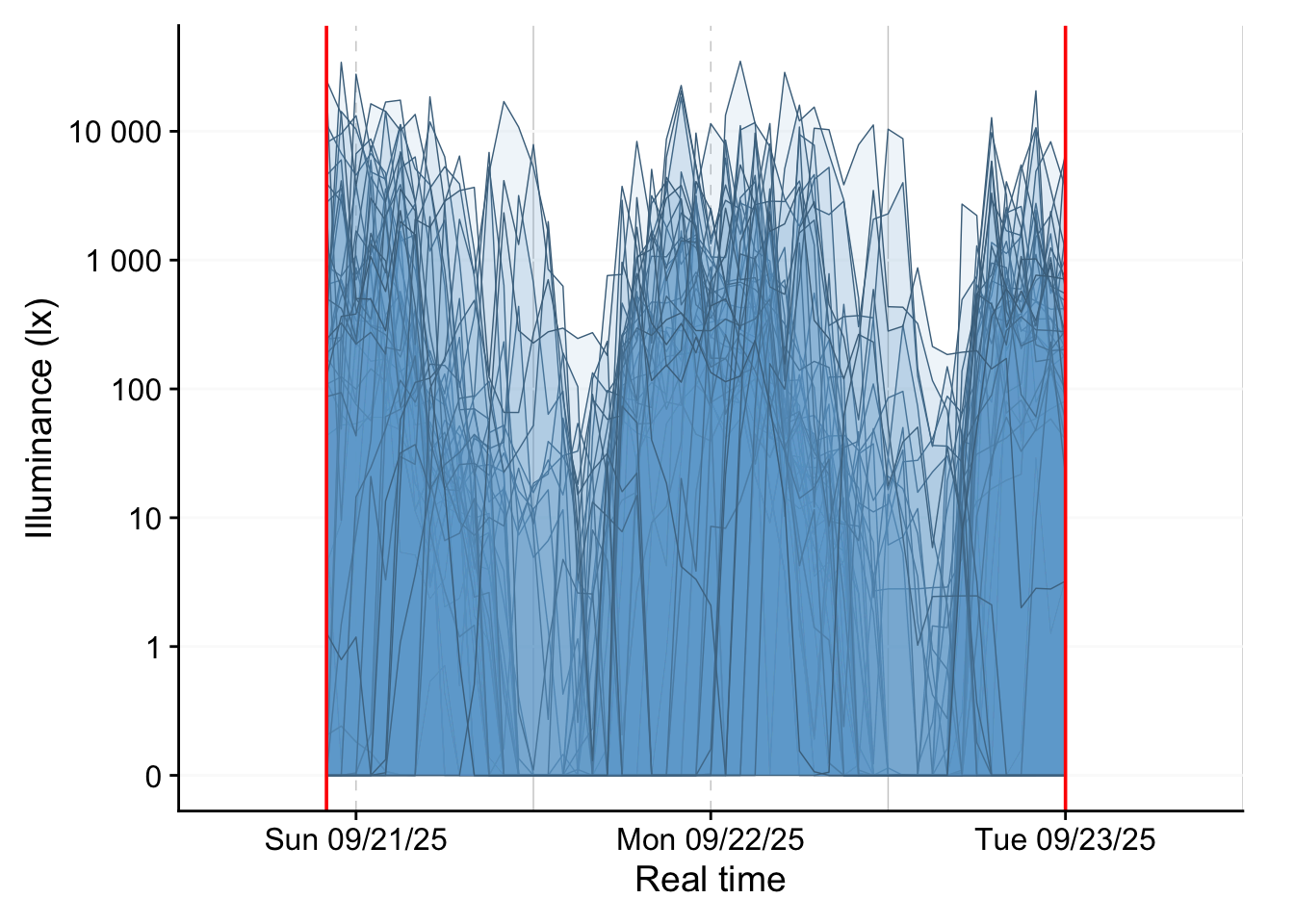
Figure 3 shows how they relate in local time, and also include a photoperiod indicator at the bottom.
light_data |>
  aggregate_Datetime("1hour") |>
1  gg_days(LIGHT,
2          x.axis = local_time,
          geom = "ribbon",
          facetting = FALSE,
          fill = "skyblue3",
          color = "skyblue4",
          alpha = 0.1,
          group = Id,
          lwd = 0.25,
          x.axis.label = "Local Time",
          y.axis.label = "Illuminance (lx)"
          ) |>
3  gg_photoperiod(alpha = 0.1, Datetime.colname = local_time, ymax = 0) +
geom_vline(xintercept = c(start_lt, end_lt), color = "red")- 1
-
Replacing the default
MEDIwith ourLIGHTvariable that is available across all device types. - 2
-
Setting the
x.axisto thelocal_time - 3
-
We also need to provide the deviating
Datetime.colnamefor the photoperiods, otherwise the calculation of the averageduskanddawnby date will be erroneous.
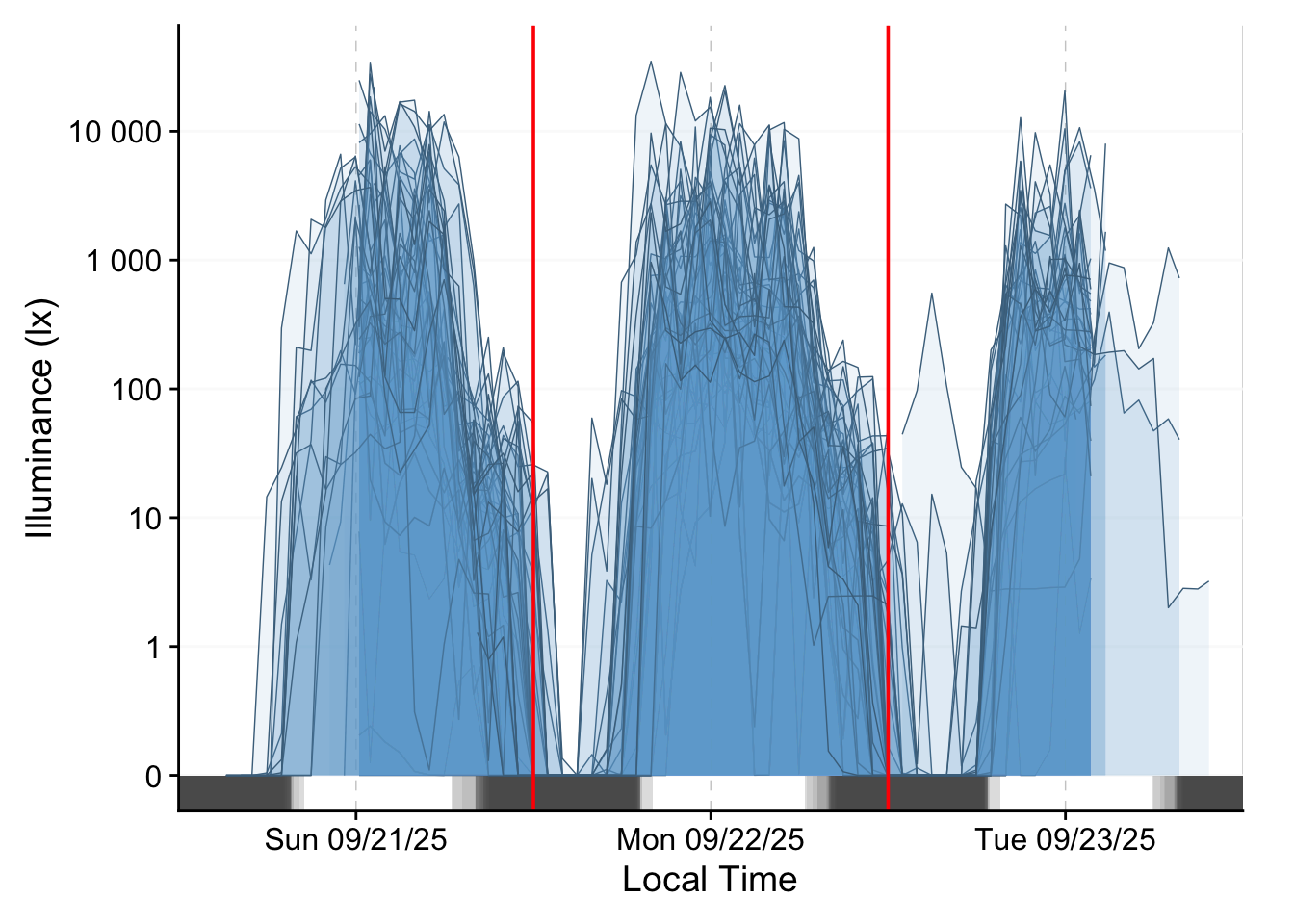
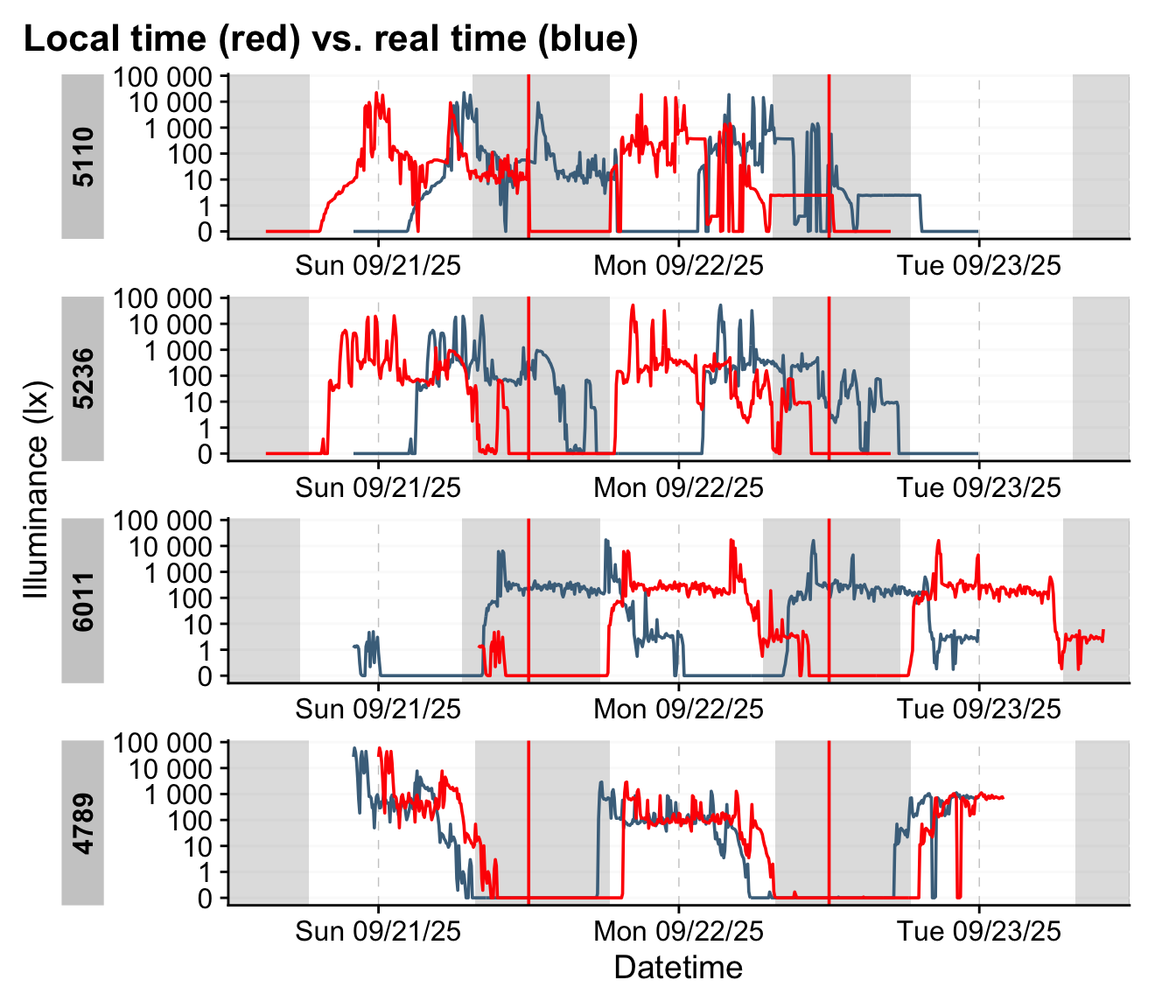
We can further create a small function that takes an indice and provide the realtime and localtime display of the dataset.
shift_plot <- function(group) {
light_data |>
1  sample_groups(sample = group) |>
  gg_days(LIGHT,
          x.axis = Datetime,
          color = "skyblue4",
          group = Id,
          x.axis.label = "Datetime",
          y.axis.label = "Illuminance (lx)"
          ) |>
  gg_photoperiod(Datetime.colname = local_time) +
    geom_line(aes(x = local_time), col = "red") +
  geom_vline(xintercept = c(start_lt, end_lt), color = "red") +
    labs(title = "Local time (red) vs. real time (blue)")
}
shift_plot(44:47)- 1
-
sample_groups()is a quick way to select groups
7 Time above threshold
In this section we calculate the time above threshold for the single day of 22 September 2025, depending on latitude and country. We require the local_time variable for that. Because we unnested the data into the participant data, that information is available to us.
TAT250 <-
light_data |>
1  filter_Date(start = "2025-09-22",
              length = "1 day",
              Datetime.colname = local_time) |>
  dplyr::summarize(
2    duration_above_threshold(
      LIGHT, local_time, threshold = 250, na.rm = TRUE,
      as.df = TRUE
    ),
3    latitude = first(latitude),
    longitude = first(longitude),
    country = first(country)
  ) |>
4  mutate(n = n(), .by = country)

TAT250 |> head()- 1
- We reduce the length of the dataset
- 2
- We calculate time above 250 lx
- 3
- Extracting coordinates and country
- 4
- Calculating how often a country is represented
# A tibble: 6 × 6
  Id    duration_above_250   latitude longitude country         n
  <fct> <Duration>              <dbl>     <dbl> <chr>       <int>
1 5812  22500s (~6.25 hours)    47.6       7.64 Switzerland     1
2 6199  31500s (~8.75 hours)    40.5      -3.70 Spain           2
3 3781  12000s (~3.33 hours)    51.5       7.24 Germany        17
4 3333  3000s (~50 minutes)      6.69     -1.62 Ghana           1
5 4081  21000s (~5.83 hours)    51.5       7.47 Germany        17
6 5777  27900s (~7.75 hours)    36.9      30.7  Turkey          4
We plot this information with a custom function, which lets us quickly exchange latitude and longitude.
TAT250_plot <- function(value){
TAT250 |>
  ggplot(
    aes(
1      x= fct_reorder(Id, duration_above_250),
      y = duration_above_250))+
  geom_col(aes(fill = {{ value }})) +
  scale_fill_viridis_b(labels = \(x) paste0(x, "°"))+
2  scale_y_time(labels = style_time,
               expand = FALSE) +
  theme_minimal() +
  theme_sub_axis_x(text = element_blank(), line = element_line()) +
  theme_sub_panel(grid.major.x = element_blank())+
  labs(x = "Participants", y = "Time above 250lx (HH:MM)")
}

3TAT250_plot(latitude) |> plotly::ggplotly()- 1
- Ordering the output by their time above 250lx
- 2
-
style_time()is aLightLogRconvenience function that produces nice time labels - 3
- Making the plot interactive
Next we display the metric by country. Because the individual variance of these data is very high, we also choose to add information about the number of individuals within a country.
TAT250 |>
  ggplot(
    aes(
      y= fct_reorder(country, duration_above_250),
      x = duration_above_250))+
  geom_boxplot(aes(col = n)) +
  scale_color_viridis_b(breaks = c(1, 3, 5, 10, 15))+
  scale_x_time(labels = style_time) +
  theme_minimal() +
  theme_sub_panel(grid.major.y = element_blank())+
  labs(y = NULL, x = "Time above 250lx (HH:MM)")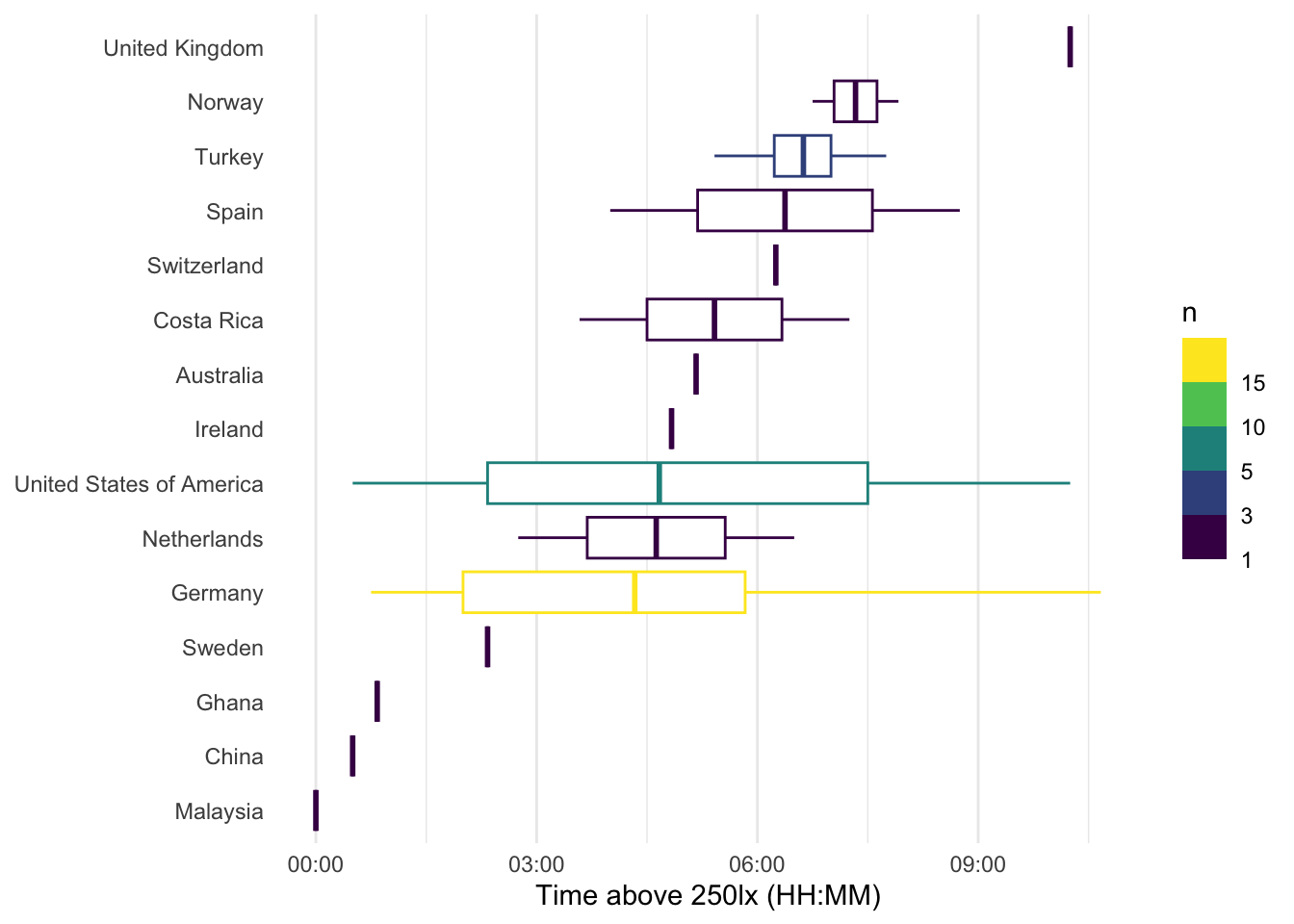
8 Event data
The last major aspect we will cover in this use case, are the activity logs that participants filled in, whenever their status changed - be it whether they took off their device, changed location, activity, or switched light settings. The activity logs are available as an R object here, this has the benefit that variable labels are retained.
In a regular analysis, we would use the non-wear information at hand before we calculated any metrics as we did in the prio sections. For this online course, however, we set the order of aspects also after didactic aspects. We want to close with this aspect here, as the activity logs are quite complex. Normally, the non-wear information would be added (and those times excluded) much earlier.
We start by loading in the logs and display a small portion:
[1] 1827 28| Start Date | Record ID | Wear type: Are you wearing the light logger at the moment? | Are you alone or with others? | Wear/Non-wear context | Activity | Non-wear wearable position | Nightstand wearable measurement direction | What is your general context? | General setting | Indoor settings | Specific indoor setting | Indoors setting (home) | Indoors setting (work) | Indoors setting (health facility) | Indoors setting (learning facility) | setting_indoors_leisurespace | Indoors setting (retail facility) | Outdoor-Indoor mixed settings | Outdoor settings | Daylight conditions | Electric lighting conditions | Phone use | Tablet use | Computer use | Television use | Were the lighting conditions in this setting self-selected? | Open-ended comments |
|---|---|---|---|---|---|---|---|---|---|---|---|---|---|---|---|---|---|---|---|---|---|---|---|---|---|---|---|
| 2025-09-21 11:59:36 | 3 | Wear | With others | Moderate activity | Moderate activity | NA | NA | Outdoors | Leisure | NA | NA | NA | NA | NA | NA | NA | NA | NA | Leisure | Shade / cloudy | NA | FALSE | FALSE | FALSE | FALSE | NA | |
| 2025-09-21 13:16:29 | 3 | Wear | With others | Light activity | Light activity | NA | NA | Mixed | Other | NA | NA | NA | NA | NA | NA | NA | NA | Other | NA | Shade / cloudy | NA | FALSE | FALSE | FALSE | FALSE | NA | |
| 2025-09-21 16:24:49 | 3 | Wear | With others | Sedentary | Sedentary | NA | NA | Mixed | Transportation (car/taxi) | NA | NA | NA | NA | NA | NA | NA | NA | Transportation (car/taxi) | NA | NA | NA | FALSE | FALSE | FALSE | FALSE | NA | |
| 2025-09-21 17:20:15 | 3 | Wear | With others | Light activity | Light activity | NA | NA | Mixed | Other | NA | NA | NA | NA | NA | NA | NA | NA | Other | NA | Shade / cloudy | NA | FALSE | FALSE | FALSE | FALSE | NA | |
| 2025-09-21 18:09:41 | 3 | Wear | With others | Sedentary | Sedentary | NA | NA | Mixed | Transportation (car/taxi) | NA | NA | NA | NA | NA | NA | NA | NA | Transportation (car/taxi) | NA | Shade / cloudy | NA | FALSE | FALSE | FALSE | FALSE | NA |
startdate marks the local time when an activity was logged. As per the instructions, it should be valid until the next activity is logged. This allows us to put start and end timepoints to each row.
events <-
  events |>
  dplyr::mutate(
1    start = as.POSIXct(startdate, tz = "UTC"),
2    status.duration = c(diff(start), NA_real_),
3    end = case_when(
              is.na(lead(start)) ~ (start + dhours(6)),
              .default = start + status.duration
              ),
4    setting_light = case_when(type == "Bedtime" ~ "Bed",
                              type == "Non-wear" ~ "Non-wear",
                              .default = setting_light |> as.character()) |>
                    factor(levels =
                           c("Bed", "Indoors", "Mixed", "Outdoors", "Non-wear")
                           ),
5    record_id = as.numeric(record_id),
6    .by = record_id,
    .after = startdate) |>
7  left_join(participant_data |> select(device_id, record_id), by = "record_id") |>
  rename(Id = device_id) |>
  mutate(Id = factor(Id)) |>
8 semi_join(participant_data, by = "record_id")- 1
-
The start variable is already presend, but it is a
characterstring and needs to be converted to a datetime - 2
- The duration of a status is the difference of consecutive time points. Because the last log entry does not have a lead, we need to add a missing value at the end.
- 3
- For the end, we differentiate between cases where there is no next entry - in those cases, we simply define the length as until the end of data collection. To cover this time span, it is safe to assume a duration of six hours. The end will be automatically capped to the end of the wearable data, when we merge it later on. In cases where there is a next entry, we use the start of the next log entry as an endpoint.
- 4
- Creating a general setting that differentiates between the main states
- 5
-
We need to add the
device_idto the event data, the link is therecord_id, which needs to be numeric for no. 7 - 6
- All the operations above need to be performed on a by-participant fashion
- 7
-
Adding
device_id. For the merge, it needs to a factorId, which is the grouping variable inlight_data - 8
-
Removing all
record_id’s that are not part ofparticipant_data
To get a feeling for the event data, lets make some summaries.
 [1] "startdate"                        "start"
 [3] "status.duration"                  "end"
 [5] "record_id"                        "type"
 [7] "social_context"                   "type.detail"
 [9] "wear_activity"                    "nonwear_activity"
[11] "nighttime"                        "setting_light"
[13] "setting_location"                 "setting_indoors"
[15] "setting_specific"                 "setting_indoors_home"
[17] "setting_indoors_workingspace"     "setting_indoors_healthfacility"
[19] "setting_indoors_learningfacility" "setting_indoors_leisurespace"
[21] "setting_indoors_retailfacility"   "setting_mixed"
[23] "setting_outdoors"                 "scenario_daylight"
[25] "scenario_electric"                "screen_phone"
[27] "screen_tablet"                    "screen_pc"
[29] "screen_tv"                        "autonomy"
[31] "notes" "Id" | participants | mean_n_logs | min_n_logs | max_n_logs |
|---|---|---|---|
| 47 | 38 | 9 | 80 |
So a total of 47 participants collected on average 38 log entries (at minimum 9, at maximum 80)
Then we can summarize the general conditions in Table 1. None of the following code cell functions are using LightLogR, but feel free to explore what each one does anyways.
events |>
  dplyr::summarize(`Daily duration` = sum(status.duration, na.rm = TRUE),
                   .by = c(setting_light, record_id)) |>
  dplyr::summarize(`Daily duration` = mean(`Daily duration`),
                   .by = c(setting_light)) |>
  dplyr::mutate(`Daily duration` =
                  `Daily duration` /
                  sum(as.numeric(`Daily duration`)) *
                  24*60*60,
                Percent =
                  (as.numeric(`Daily duration`)/
                  sum(as.numeric(`Daily duration`)))
                ) |>
  arrange(setting_light) |>
  gt(rowname_col = "setting_light") |>
  grand_summary_rows(
                     fns = list(
      sum ~ sum(.)
    ),
    fmt = list(~ fmt_percent(., columns = Percent, decimals = 0),
               ~ fmt_duration(., columns = `Daily duration`,
               input_units = "secs",
               max_output_units = 3))
    ) |>
  fmt_duration(`Daily duration`,
               input_units = "secs",
               max_output_units = 2) |>
  fmt_percent(columns = Percent, decimals = 0) |>
  sub_missing() |>
tab_header(title = "Mean daily duration in condition")| Mean daily duration in condition | ||
| Daily duration | Percent | |
|---|---|---|
| Bed | 5h 59m | 25% |
| Indoors | 10h 6m | 42% |
| Mixed | 1h 56m | 8% |
| Outdoors | 1h 31m | 6% |
| Non-wear | 2h 59m | 12% |
| — | 1h 25m | 6% |
| sum | 1d | 100% |
8.1 Combining Events with light data
In this step, we expand the light measurements with the event data.
light_data <-
light_data |>
  select(
    device_id:Datetime, local_time, LIGHT,
    dawn, dusk, photoperiod, photoperiod.state) |>
1 add_states(events, Datetime.colname = local_time)- 1
-
To properly add the states information, we need to select the
local_timevariable
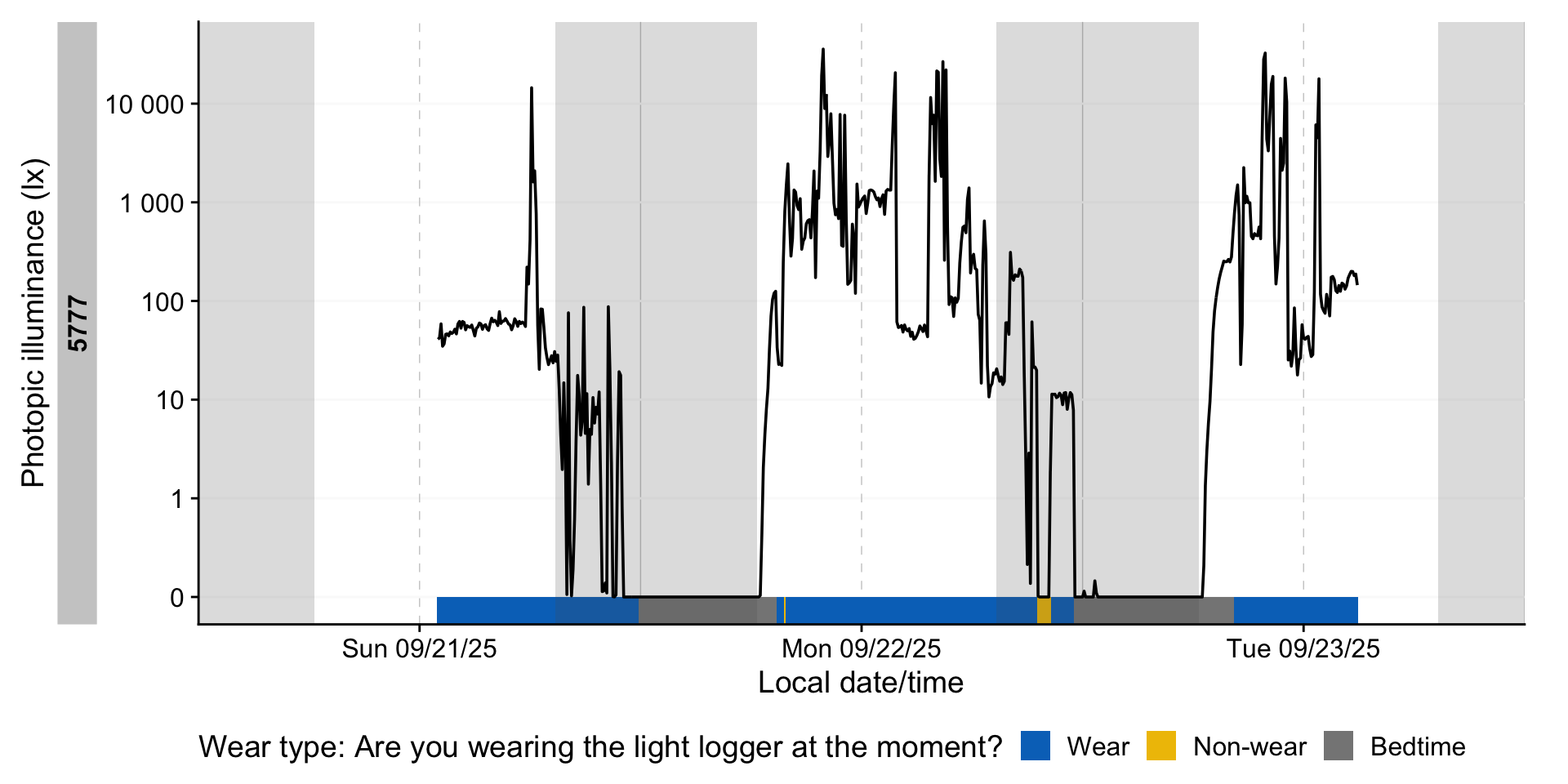
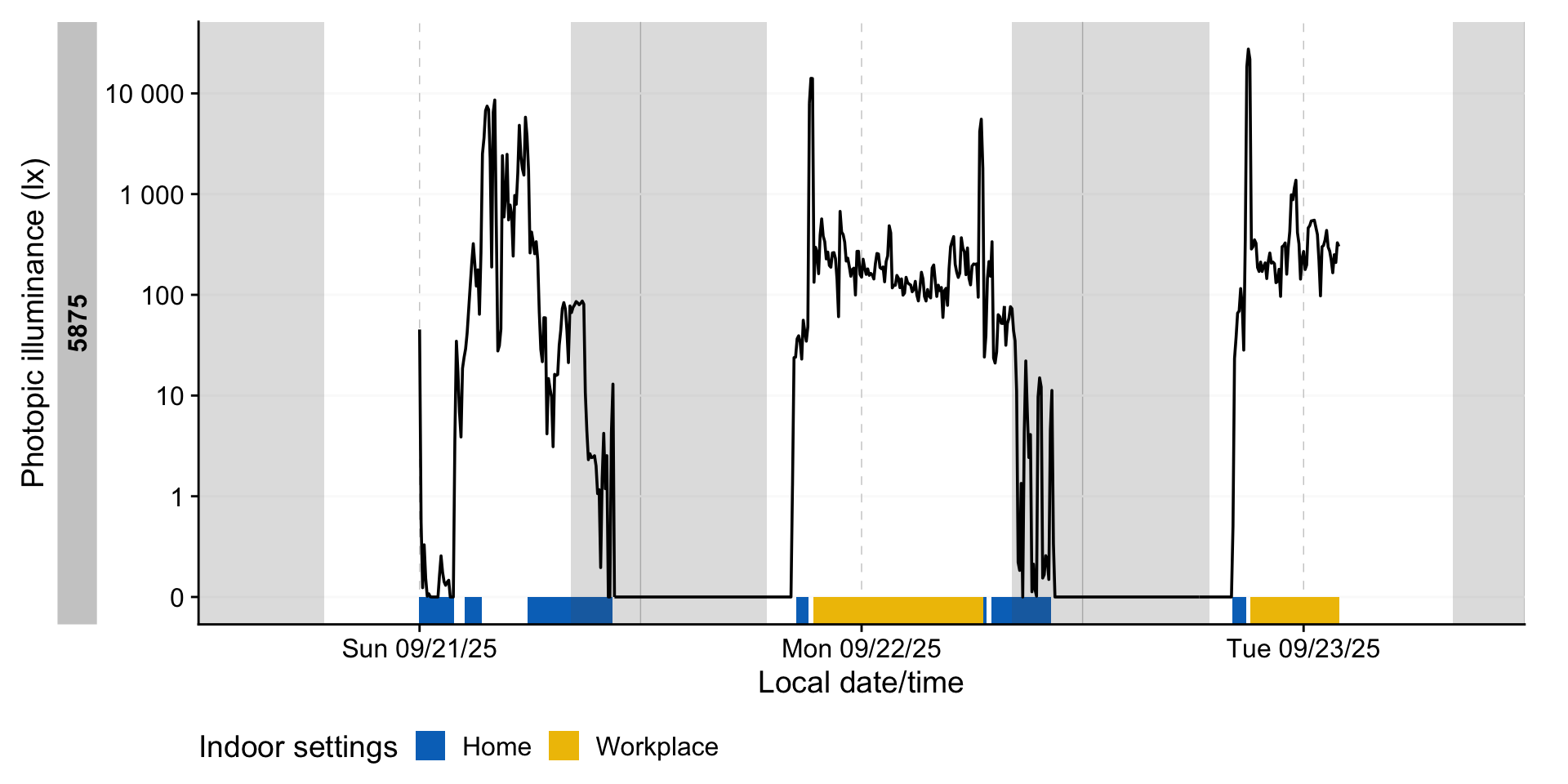
Next, we can visualize the activity logs together with the light information. To facilitate this, we again create a helper function. This opens a whole range of options to explore participants and states
state_plot <- function(variable, sample) {
light_data |>
    sample_groups(sample = sample) |>
  gg_days(LIGHT,
          x.axis = local_time,
          y.axis.label = "Photopic illuminance (lx)") |>
    gg_photoperiod(Datetime.colname = local_time) |>
  gg_state({{ variable }}, aes_fill = {{ variable }},
           alpha = 1, ymax = 0, Datetime.colname = local_time) +
    theme_sub_legend(position = "bottom")
}
state_plot(setting_light, 6:7)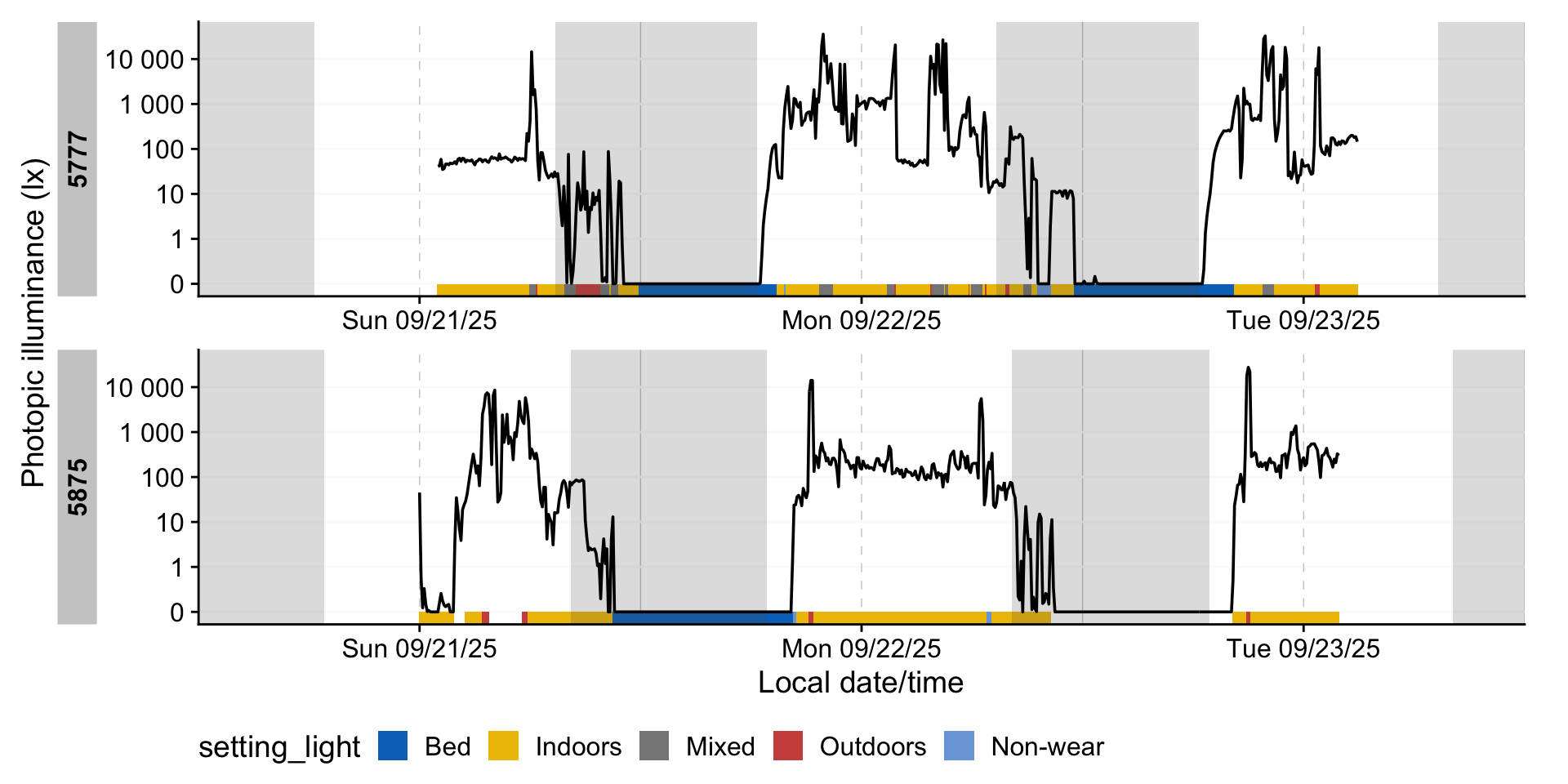
8.2 Remove non-wear
As we now have logs of non-wear (both during the day and in sleep), we can set those measurements to NA.
We can check whether we were successful, by summarizing our data depending on type.
# A tibble: 4 × 2
  type      mean
  <fct>    <dbl>
1 Wear     1208.
2 Non-wear  NaN
3 Bedtime   NaN
4 <NA>      303.
This shows us that removing those instances was successful. To close up this use case, we can calculate a few metrics depending on the context with a helper function:
quick_summaries <- function(variable) {
light_data |>
  group_by({{ variable }}, .add = TRUE) |>
1    durations(LIGHT, show.missing = TRUE, FALSE.as.NA = TRUE) |>
    ungroup(Id) |>
2    summarize_numeric(prefix = "mean_per_participant_") |>
3    extract_metric(
      light_data |>
        mutate({{ variable }} := factor({{ variable}})) |>
        group_by({{ variable }}
                 ),
4      identifying.colname = {{ variable }},
      Datetime.colname = local_time,
5      geo_mean = log_zero_inflated(LIGHT) |>
             mean(na.rm = TRUE) |>
             exp_zero_inflated()
      ) |>
    rename(participants = episodes) |>
    drop_na() |>
    gt() |>
    fmt_number(geo_mean)
}- 1
- Calculate the duration of every state for each participant
- 2
- Calculate the average duration per state across participants
- 3
-
We add the geometric mean to the summary with
extract_metric, and supply the original dataset, grouped in the same way as our summary is - 4
- Secondary settings
- 5
-
The formula for the geometric mean uses
log_zero_inflated()and its counterpartexp_zero_inflated()to allow for zero-lx values in the dataset
With this helper we can get quick overviews for many aspects:
| setting_light | mean_per_participant_duration | mean_per_participant_missing | mean_per_participant_total | total_duration | participants | geo_mean |
|---|---|---|---|---|---|---|
| Indoors | 76660s (~21.29 hours) | 5681s (~1.58 hours) | 82340s (~22.87 hours) | 3603000s (~5.96 weeks) | 47 | 45.36 |
| Mixed | 15703s (~4.36 hours) | 853s (~14.22 minutes) | 16555s (~4.6 hours) | 596700s (~6.91 days) | 38 | 239.03 |
| Outdoors | 12364s (~3.43 hours) | 255s (~4.25 minutes) | 12619s (~3.51 hours) | 581100s (~6.73 days) | 47 | 559.38 |
| setting_indoors | mean_per_participant_duration | mean_per_participant_missing | mean_per_participant_total | total_duration | participants | geo_mean |
|---|---|---|---|---|---|---|
| Home | 51098s (~14.19 hours) | 6965s (~1.93 hours) | 58063s (~16.13 hours) | 2350500s (~3.89 weeks) | 46 | 20.80 |
| Workplace | 30450s (~8.46 hours) | 0s | 30450s (~8.46 hours) | 913500s (~1.51 weeks) | 30 | 295.28 |
| Education | 5057s (~1.4 hours) | 0s | 5057s (~1.4 hours) | 35400s (~9.83 hours) | 7 | 416.78 |
| Commercial | 7488s (~2.08 hours) | 324s (~5.4 minutes) | 7812s (~2.17 hours) | 187200s (~2.17 days) | 25 | 116.97 |
| Healthcare | 3900s (~1.08 hours) | 0s | 3900s (~1.08 hours) | 7800s (~2.17 hours) | 3 | 468.57 |
| Leisure | 5130s (~1.43 hours) | 270s (~4.5 minutes) | 5400s (~1.5 hours) | 51300s (~14.25 hours) | 11 | 58.89 |
| Other | 4700s (~1.31 hours) | 975s (~16.25 minutes) | 5675s (~1.58 hours) | 56400s (~15.67 hours) | 13 | 57.92 |
| setting_outdoors | mean_per_participant_duration | mean_per_participant_missing | mean_per_participant_total | total_duration | participants | geo_mean |
|---|---|---|---|---|---|---|
| Home | 14876s (~4.13 hours) | 18s | 14894s (~4.14 hours) | 252900s (~2.93 days) | 18 | 227.70 |
| Workplace | 5127s (~1.42 hours) | 82s (~1.37 minutes) | 5209s (~1.45 hours) | 56400s (~15.67 hours) | 11 | 335.06 |
| Education | 750s (~12.5 minutes) | 0s | 750s (~12.5 minutes) | 1500s (~25 minutes) | 2 | 6,663.65 |
| Commercial | 3471s (~57.85 minutes) | 0s | 3471s (~57.85 minutes) | 24300s (~6.75 hours) | 8 | 576.79 |
| Leisure | 7436s (~2.07 hours) | 332s (~5.53 minutes) | 7768s (~2.16 hours) | 208200s (~2.41 days) | 28 | 745.51 |
| Other | 6062s (~1.68 hours) | 44s | 6106s (~1.7 hours) | 206100s (~2.39 days) | 36 | 680.07 |
| setting_mixed | mean_per_participant_duration | mean_per_participant_missing | mean_per_participant_total | total_duration | participants | geo_mean |
|---|---|---|---|---|---|---|
| Covered patio or terrace | 10671s (~2.96 hours) | 0s | 10671s (~2.96 hours) | 74700s (~20.75 hours) | 9 | 59.17 |
| Semi-open corridor/gallery | 3900s (~1.08 hours) | 660s (~11 minutes) | 4560s (~1.27 hours) | 19500s (~5.42 hours) | 8 | 172.54 |
| Balcony | 1500s (~25 minutes) | 0s | 1500s (~25 minutes) | 3000s (~50 minutes) | 2 | 4.30 |
| Veranda | 24450s (~6.79 hours) | 0s | 24450s (~6.79 hours) | 48900s (~13.58 hours) | 3 | 339.81 |
| Atrium | 900s (~15 minutes) | 0s | 900s (~15 minutes) | 900s (~15 minutes) | 1 | 1,099.04 |
| Transportation (car/taxi) | 9970s (~2.77 hours) | 290s (~4.83 minutes) | 10260s (~2.85 hours) | 299100s (~3.46 days) | 30 | 583.61 |
| Transportation (bus or commuter/regional rail) | 3545s (~59.08 minutes) | 300s (~5 minutes) | 3845s (~1.07 hours) | 39000s (~10.83 hours) | 11 | 224.10 |
| Transportation (long-distance train) | 7800s (~2.17 hours) | 0s | 7800s (~2.17 hours) | 31200s (~8.67 hours) | 4 | 387.55 |
| Transportation (underground, subway) | 1350s (~22.5 minutes) | 0s | 1350s (~22.5 minutes) | 5400s (~1.5 hours) | 5 | 190.73 |
| Transportation (airplane) | 9750s (~2.71 hours) | 150s (~2.5 minutes) | 9900s (~2.75 hours) | 39000s (~10.83 hours) | 4 | 142.49 |
| Transportation (bike) | 14700s (~4.08 hours) | 600s (~10 minutes) | 15300s (~4.25 hours) | 44100s (~12.25 hours) | 3 | 29.25 |
| Other | 41933s (~11.65 hours) | 200s (~3.33 minutes) | 42133s (~11.7 hours) | 377400s (~4.37 days) | 10 | 212.83 |
| wear_activity | mean_per_participant_duration | mean_per_participant_missing | mean_per_participant_total | total_duration | participants | geo_mean |
|---|---|---|---|---|---|---|
| Sedentary | 64991s (~18.05 hours) | 5221s (~1.45 hours) | 70213s (~19.5 hours) | 3054600s (~5.05 weeks) | 47 | 52.97 |
| Light activity | 30430s (~8.45 hours) | 1180s (~19.67 minutes) | 31611s (~8.78 hours) | 1399800s (~2.31 weeks) | 46 | 136.54 |
| Moderate activity | 8150s (~2.26 hours) | 350s (~5.83 minutes) | 8500s (~2.36 hours) | 244500s (~2.83 days) | 30 | 162.56 |
| High-intensity activity | 6630s (~1.84 hours) | 30s | 6660s (~1.85 hours) | 66300s (~18.42 hours) | 10 | 130.65 |
9 Circular time
We close this use case off with with a small detour to averaging of times. Many calculations in wearable data analysis involves averaging. This is tricky for variables that are circular in nature, like the time of day. consider the following case:
When we take the average of these two, we get noon on 8 December.
Depending on what the values represent, this is a correct handling. But consider they represent sleep times. In this case the averaging results to not output what we want, especially the sensitivity to the date for the result. We can lose the reliance on the date if we use a function like Datetime2Time() or summarize_numeric()s defaults:
# A tibble: 2 × 2
  times  times2
  <time> <time>
1 23:59  23:59
2 00:01 00:01 # A tibble: 1 × 3
mean_times mean_times2 episodes
<time> <time> <int>
1 12:00 12:00 2Now we have consistent results - but they are still wrong in the context we are thinking in. We need circular time for this, i.e., where the distance of two timepoints is equal, even across midnight. LightLogR has implemented functions from the circular package to make this process easy. Simply specify a circular handling. After the summary, apply Circular2Time() to backtransform to the common representation.
# A tibble: 2 × 2
  times       times2
  <circular>  <circular>
1 6.278821984 6.278821984
2 0.004363323 0.004363323# A tibble: 1 × 3
mean_times mean_times2 episodes
<time> <time> <int>
1 00'00.000000" 00'00.000000" 2We can use this approach in our use case. Say we want to know the average Bedtime of people, based on their logs:
| start |
|---|
| 2025-09-21 20:54:37 |
| 2025-09-22 19:46:08 |
| 2025-09-21 14:06:12 |
| 2025-09-22 00:28:40 |
| 2025-09-22 23:12:22 |
| 2025-09-22 19:36:30 |
Now focus on the difference of whether we work with circular time or not:
10 Conclusion
Congratulations! You have finished this section of the advanced course. If you go back to the homepage, you can select one of the other use cases.